Novice to Advanced Marketing System

NAMS | Building an Online Business to Support Your Dreams

  • Home
  • Product Catalog
  • Free Resources
  • Affiliates
  • Support
  • Blog
  • Masterminds
    • NAMS 90 Mastermind
    • Affiliate Sales Dominators Mastermind
    • Idea To Income Mastermind

Marketing Quiz Confirmation

By David Perdew Leave a Comment

While you wait for the confirmation email…

This is what to expect if you are new to MyNAMS.

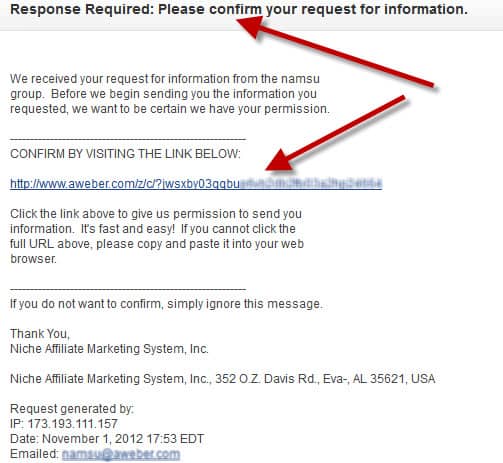
You’ll receive a confirmation email. After confirming the link in the e-mail below, you’ll be routed back to the Marketing Quiz Results page.

A login is not required, but by putting your name and e-mail into our system we’ll notify you of additional free training and gifts when available.
So, be sure to confirm your e-mail when it arrives in your inbox. It will look like this:
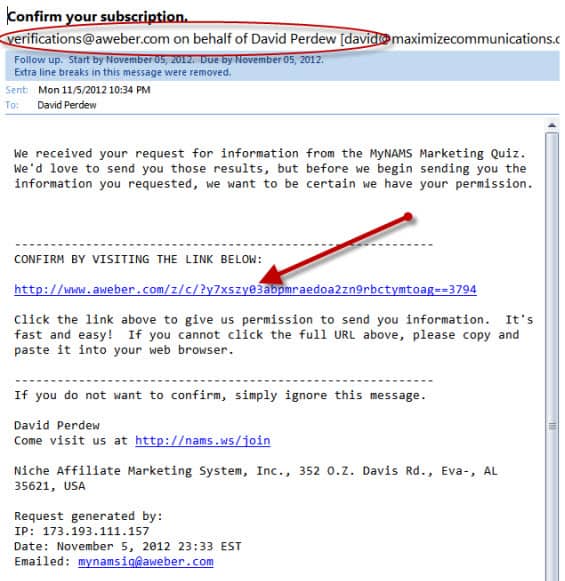
Once you click the confirmation link, you’ll be taken to the Marketing Quiz Results page.
 

Category: Business Operations, Hidden

7 Part Series Confirmation

By David Perdew Leave a Comment

While you wait for the confirmation email…

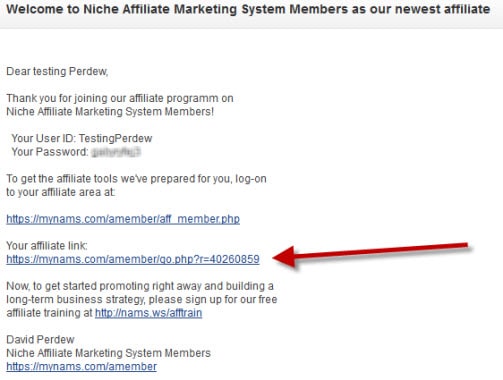
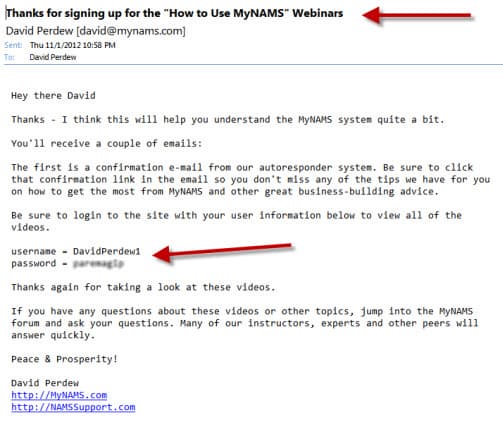
This is what to expect. You’ll receive three emails. The first is a welcome e-mail. It includes your username and password to login to the site. When you do login, you’ll return to the 7-part series page where you’ll find all the videos on that page.

Be sure to save that login information. You always want to log in to the MyNAMS site to access what’s available to you.

Welcome e-mail

The second e-mail you receive is an autoresponder confirmation. Click the link and you’ll be added to our e-mail list. You’ll  receive special information about using the MyNAMS.com site and other valuable training material.

Welcome eMail Part 2

And finally, since you are new to MyNAMS, you are automatically added to the affiliate program so that you can refer people to MyNAMS.com and continue to make commissions.

Welcome e-mail part 3

Category: Business Operations, Hidden

7-Part Series: How to Use MyNAMS

By David Perdew 8 Comments

Welcome to the MyNAMS Total Business System! There’s a ton here, so pay attention!

Why bring you to a page with more tutorial videos?

This site is huge.

And the biggest complaint that we get - and we're always trying to improve - is that it's difficult to know where to find your stuff and what to do next.

So, we've broken the site into sections. You may not need all of them right now.

For example, if you're brand new to business - especially business on the web, you'll want to start in the MyNAMS Dashboard. That's Session 2.

If you have a site, but need more products to sell, you'll want to see what's cooking in the Niche Mall where you can sell any of the products for 100% instant commission. That's Session 6. And so on.

In any case, start with the overview below. And if you have questions, pop them in the support desk.

Session1 – Overview


MyNAMS.com, at first glance,  can appear to be overwhelming because it's so big. But truly, it's pretty simple once you carve off a chunk.

It's like walking through Home Depot for the first time. How on earth do you find anything? Wait, there are those signs on each aisle telling you what's there.

We have a lot of signs at MyNAMS too. But we also thought it would be a great idea to walk you down the aisles and show you what's on the shelves.

So, we've created a 7-Part  Series to demonstrate the different pieces of the MyNAMS website.

We're spending 30 minutes each on a specific section. Then we'll open it up for questions.

The first video is below. If you're a current member, you'll see the rest of them below that. If you're a visitor to MyNAMS, you can sign up to view the rest of videos for free by inputting the requested information in the box at the right.

Be sure to use your preferred e-mail address because we will send you confirmation link.

In this series, we'll dig into:

7 Short Webinars on How to Use MyNAMS where you will discover  how to use everything in the membership site. Whether you're just thinking about joining MyNAMS or you're a member already and want to see how to use it better to support your business goals, this series shows you how to get the most out of this massive site.

  • Session1 – Overview
  • Session2 – My Membership / Training
  • Session3 – My Membership / Downloads
  • Session4 – Community / Overview / Forum / Blogs
  • Session5 – Community / Articles / Calendar / Images
  • Session6 – Affiliates / Niche Mall
  • Session7 – NAMS Workshop

Session2 – My Membership / Training


Session3 – My Membership / Downloads


Session4 – Community / Overview / Forum / Blogs


Session5 – Community / Articles / Calendar / Images


Session6 – Affiliates / Niche Mall


Session7 – NAMS Workshop


Why the MyNAMS Insiders Club is EXACTLY
what you're looking for!

MyNAMS Team

MyNAMS TEAM - You never have to work in isolation again!

The MyNAMS Team goes way beyond the staff and support personnel. We've put together a group of people who make it their mission to ensure your success. With more than 75 instructors and 100s of members, you find people who can answer your questions quickly, partner with you to create products, and build relationships that help you launch your business or take it to the next level.

We've worked diligently to ensure you have the ability to communicate with us, instructors, and peers (at your own experience level) in a safe environment and find the right mentors or coaches just for you. We make the introductions that you want.

Look for the icon at the left in the benefits grid to see the specific team options we offer. 

icontraining200

MyNAMS Training - Learn what you need when you need to learn it!

The MyNAMS Training system is focused on thorough step-by-step instruction with that meets you where you are. It makes no sense to teach you advanced strategies and techniques when you don't have a blog or website. And teaching you how to install a blog when you have dozens already is ridiculous. First, we determine where you are in your experience and then we point you to the right level of training that will enhance your business experience from Novice to Advanced.

Yes! We teach marketing, traffic generation, technology, keyword research and much more, but only when you're ready. And if you need help just getting the technical aspects of doing business online, we have more than 1300 tutorial videos in the Library.

Look for the icon at the left in the benefits grid to see the specific training options we offer.

icontools200

MyNAMS Tools - Content, graphics, audio, checklists - we've got it for you!

The MyNAMS Tool belt comes with just about everything you need to get a business up and running. In fact, you can be selling products from the Niche Mall even if you've never sold anything before and don't have a website. One of the most frustrating parts about doing business online is realizing you have to nickel and dime yourself to bankrupcy before you can actually get a site up. Not with us.

We provide you graphics, article content, images, audio clips, reports, sales funnels, turnkey websites, and even adsense website portals so you can begin immediately to create or improve your business with confidence that you don't have to spend a ton more cash.

Look for the icon at the left in the benefits grid to see the specific tools options we offer.

To find out more about the MyNAMS Insiders Club, click the link below!

Continue to Custom Content Wizard here

Category: Business Operations, Featured Content

Kevin Riley Interview About MyNAMS

By David Perdew Leave a Comment


Category: Hidden, Social Marketing

Security Virus In Skype

By David Perdew 3 Comments

Skype Virus Alert- Rogue Links Coming from Your EXISTING Contacts

Do you love Skype™ as much as I do? I use Skype on a regular basis to communicate not only with friends, but also clients and important business connections.

SkypeBut what happens when you realize that one of your business associates, or even a family member sends you a link that infects your computer? That's exactly what is happening. On October 8, 2012 a new virus affecting Skype users was discovered and it's being reported all over the Web, including CNET, and Mashable.
Don't believe for a second that your legitimate contacts are sending those links to you on purpose. It is very likely they they have been infected, and that they have no control whatsoever over their system. In fact, it's possible that their computer is even being held under virtual lock-and-key for monetary ransom.

Read on to learn more about this unsettling Botnet Scam...

Last year:

Beginning on or around March 15, 2011, numerous people reported that they were receiving virus scam calls on Skype from a robotic voice telling them that their computer is infected and to go to a website to buy a Fake Anti-Virus program to fix it.

Now:

Similarly, as of October 8th 2012, people have been allegedly receiving automated messages from what appear to be automated bots (Dorkbot Worm) with the socially-engineered message: " Lol is this your new profile pic?" with a link to what might appear to be a legitimate zipped image to the layman.

This bot is very clever and spreads through a few computers to begin with, and then automatically targeted contacts in the infected user's Skype contact list. As these contacts receive the automated messages, many of them wouldn't think twice about opening the link because they are receiving the message and link from an established (possible credible) contact on their “friend" list.

If one were to click the provided link, they would download a .zip file. Upon extraction, an executable file could infect your computer. To many people, this would be a sign that something is wrong; however if they have extracted the file and their Anti-Virus system hasn't kicked in and blocked the file, or it is a zero-day attack (no cure has been discovered yet), it is likely too late.

This virus is commonly known as "ransomware." It essentially holds the victim's computer hostage until the victim agrees to pay a fee of $200 to access his/her (now locked) filesystem within 48 hours.

Obviously this means that the perpetrator has full access to not only the victim's personal files, but also any saved passwords the victim may have stored in their system. The malware (Worm Virus) has a multi-tasking feature designed to specifically steal usernames and passwords to social networking sites and PayPal accounts.

And to take it even further, this multi-tasking virus turns infected servers into "botnet" servers to perform DOS (denial of service) attacks on targeted websites, and continues to downloading further viruses on the (already infected) computer.

All Skype has said about this infection so far is that users need to keep Skype updated, along with computer system updates that one should be regularly maintaining. They also said not to click on any links that may look suspicious, even coming from your established contacts.

Once a user is infected, the virus will not only hijack the user's system and hold the files for ransom while stealing the user's passwords but will also begin to send similar messages over Skype to all people on the user's contact list in order to keep the virus circulating.

The link being circulated is also socially-engineered to fool users into thinking that it is legitimate. The structure is as follows:

goo.gl/B463c?img=johnsmith - (link not clickable for your protection.)

Looking at the structure of the link, we first see that the URL appears to be a Google shortlink. Then we see some random numbers and letters in an alphanumeric format, which is characteristic of any typical link. The most socially-engineered part of the link is that the final portion appears to be an image (img), and also implies that the image (img) has something to do with the user in question (in this case, John Smith). This can easily fool even the most seasoned user into thinking that the link is legitimate.

Skype Security and Computer Rescue Kit

Are you worried about getting infected? Not 100% sure that your security is in place and ready to kick any hacker zombie attacks? I know some people that have already received this instant message from some of their contacts.

If you're unsure whether your Skype installation, your computer, or your network is secure, don't take any chances.

Want to ramp up your security in general to prevent these things from affecting you?

WPSecurityClub has prepared a kit featuring details on how to keep Skype, your computer, and your network secure. As a bonus, included is a document on emergency computer restoration in case anyone has already been infected. Additionally, a resource sheet will be provided with some key tools referenced in the documents and on the WPSecurityLock website.

Why the MyNAMS Insiders Club is EXACTLY
what you're looking for!

MyNAMS Team

MyNAMS TEAM - You never have to work in isolation again!

The MyNAMS Team goes way beyond the staff and support personnel. We've put together a group of people who make it their mission to ensure your success. With more than 75 instructors and 100s of members, you find people who can answer your questions quickly, partner with you to create products, and build relationships that help you launch your business or take it to the next level.

We've worked diligently to ensure you have the ability to communicate with us, instructors, and peers (at your own experience level) in a safe environment and find the right mentors or coaches just for you. We make the introductions that you want.

Look for the icon at the left in the benefits grid to see the specific team options we offer. 

icontraining200

MyNAMS Training - Learn what you need when you need to learn it!

The MyNAMS Training system is focused on thorough step-by-step instruction with that meets you where you are. It makes no sense to teach you advanced strategies and techniques when you don't have a blog or website. And teaching you how to install a blog when you have dozens already is ridiculous. First, we determine where you are in your experience and then we point you to the right level of training that will enhance your business experience from Novice to Advanced.

Yes! We teach marketing, traffic generation, technology, keyword research and much more, but only when you're ready. And if you need help just getting the technical aspects of doing business online, we have more than 1300 tutorial videos in the Library.

Look for the icon at the left in the benefits grid to see the specific training options we offer.

icontools200

MyNAMS Tools - Content, graphics, audio, checklists - we've got it for you!

The MyNAMS Tool belt comes with just about everything you need to get a business up and running. In fact, you can be selling products from the Niche Mall even if you've never sold anything before and don't have a website. One of the most frustrating parts about doing business online is realizing you have to nickel and dime yourself to bankrupcy before you can actually get a site up. Not with us.

We provide you graphics, article content, images, audio clips, reports, sales funnels, turnkey websites, and even adsense website portals so you can begin immediately to create or improve your business with confidence that you don't have to spend a ton more cash.

Look for the icon at the left in the benefits grid to see the specific tools options we offer.

To find out more about the MyNAMS Insiders Club, click the link below!

Continue to Custom Content Wizard here

Category: Business Operations, Featured Content

  • Previous
  • 1
  • …
  • 38
  • 39
  • 40
  • 41
  • 42
  • …
  • 59
  • Next
  • Help Desk
  • Contact
  • Support
  • Privacy Policy
  • Earnings Disclaimer
  • Legal Notices
  • Membership Agreement
  • TOS
  • Testimonials
  • Affiliate Disclosure

Copyright © 2025 · MyNAMS.com · All rights reserved
NAMS, Inc. 203 CR 890, Etowah, TN 37331 USA

Disclosure: Some links on this website may be affiliate links. If you make a purchase through one of our affiliate links, we may earn a commission.
We only endorse products and services we use or trust.