Novice to Advanced Marketing System

NAMS | Building an Online Business to Support Your Dreams

  • Home
  • Product Catalog
  • Free Resources
  • Affiliates
  • Support
  • Blog
  • Masterminds
    • NAMS 90 Mastermind
    • Affiliate Sales Dominators Mastermind
    • Idea To Income Mastermind

Storytelling is a learned skill

By David Perdew 1 Comment

Some people are natural storytellers…

I’ve never met one.

I guarantee you I’m not not a natural!

Like EVERY ONE that I know who is a great storyteller, I had to learn that skill. And like me, they studied and practiced storytelling until it appeared effortless.

Sure, we can all talk what happened at last night’s at the football game, but that’s chit-chat.

For your business, you want to tell stories with a point to help your business.

Those stories persuade people to take actions you want them to take.

The good news is that it’s not that hard once you have a simple system to follow.

If you learn the basic skills, it becomes easier. Your creativity bubbles to the top. And you improve every time you tell a story.

With the simple system I’m going to show you, telling stories that persuade others is an easy process.

But before we get there…

If storytelling scares you a bit, you’re already having a reaction to what I’ve said so far.

You may be thinking:

  • “I can’t tell stories.”
  • “Nothing interesting ever happens to me.”
  • “Nobody cares about my daily stories.”
  • “Why would anyone want to hear my story?”
  • “I don’t know what makes a good story!”

First…

Hogwash!

Second…

The primary issue here is that you think telling a story is about you.

Sorry to disappoint. Your story has nothing to do with you. It’s about your listener. How do THEY relate to the story you’re telling?

What if we show you a template that anyone can use called 7 Steps to Creating Stories with a Point!

These are:

The Hook

cthe HookIn today’s information overloaded world, you’ve only got about 3 seconds to grab your readers attention.

So, you must amaze, shock, anger, scare, or identify with your readers! This is your only chance to connect on an emotional level with the audience. They will click away to something MORE interesting if not hooked…

One of the best ways to engage is to ask a question and leave it unanswered, but promise an answer later.

This is no time to be shy.

The Setup

This is where most people mess up.

http://nams.ws/storytelling - the SetupYou don’t have to provide long-winded, descriptions, but use the rest of the tools to paint the scene so the reader or viewer sees exactly what you want them to see and feel in their mind’s eye.

Provide the context for your story. Make the problem crystal clear, painful and easy to identify with.

Tease the audience with the solution, but don’t reveal it. Stay engaged.

Tip: Context is like a snake – Hold on to it too long and you’re going to get bit.

The Parachute

http://nams.ws/storytelling - the ParachuteThink of all the great action movies you love. You never start out slow and meandering into the story. You drop right into the middle of it with a bang.

Even if it’s a love story, the conflict jumps very fast. Make it visual. Make it fast and do it really quickly. You can show a lot really fast. The audience sees and feels what’s going on. If the audience can’t see the picture as you’re telling it, then the message is NOT being delivered effectively.

The Theme

What’s your point?

http://nams.ws/storytelling - the themeSupport that point with every sentence. Use foreshadowing to make sure that next sentence leads to the point of the story in a subtle and logical sequence.

The theme is not a single element that happens in sequence, but more like the seasoning that’s added to a broth so that it colors the entire story. The audience should never doubt what you’re trying to say.

You’re leading them clearly from one place to another. The point should be subtly and repetitively added to every other element in the story.

Do NOT confuse the audience by straying from the point.

The Transition

http://nams.ws/storytelling - the transitionHave you ever watched movie that introduced a new main character in the middle of the film and then started focusing on that person throughout?

Probably not because that’s story suicide. When the transition from one scene to another causes a bump in the psyche, confusion ensues. And when that happens, the audience checks out. Literally.

Remember, done well, your audience is hanging on the story because it’s been so engaging.

They need resolution.

Remind them the problem has a solution, and you’re going to reveal it shortly, but first get into more detail about the problem leading to the solution.

The Sell

Reveal the solution you’ve found.

http://nams.ws/storytelling - the sellDon’t GIVE the solution, but give enough information to make sure the audience sees the potential resolution.

And introduce the call to action, whether that’s to purchase, share the content, opt-in…whatever.

This solved your problem. And it can solve theirs too if they get this solution. Remind them how much pain you (they – remember, you’re identifying with them) were in because of the problem and how great it is now. The solution is the key.


The Tie Back

Bring it back home.
http://nams.ws/storytelling - the tie backRemember, that unanswered question?

Now’s the time to bring it back up and provide the answer. Obviously, the unanswered question is solved by the solution you presented in The Sell.

You’ve come full circle.

You started a story with an example, quote or character. Now, come back to that very same element and demonstrate why it was so important to the story.

Want a couple of examples?

You have to hook your readers and create enough curiosity to encourage them to continue reading.

Everyone has a story to tell.

You can create exciting, interesting content from simple daily events in your life. You just have to open your mind enough to weave those stories into your message. Guess what? There are proven strategies and methods to weave these stories into your business.

My daughter just ran her first half marathon. I asked her about the process. What she learned. How she planned for it.

The first thing she said was,

“Believe it or not, I took a running class. I know it sounds stupid. But guess what? I was running all wrong. Once I learned how to do it correctly, then I began having these tiny little victories which made me want to get better. Then I began enjoying it and  wanted more challenges. I wanted to go further and harder and longer.”

Then I asked her how she could use that lesson and apply it to our business. She said, “Well, I needed training so I asked for help from someone who was an expert. Then as I got better and more confident, I began telling more people about what I was doing and then people started asking for my advice. A few folks then asked me to be their running partner and all of the sudden people looked at me with authority. Now I want to help people who are stuck thinking they can’t do it. People who don’t have the confidence to even put their shoes on and I am trying to build a plan on how to do that.”

You see that’s what happens when we get the right training for specifically what we need from the right expert.

That’s what I do at MyNAMS. I teach our students how to create the business of their dreams.

Storytelling is huge part of portraying your vision to your customers. You have to identify and relate to your customers. They have to buy into your vision and the only way to do that is to build your message and connect emotionally with your audience.

I have developed 3 great templates to get you started to becoming a great storyteller!

The first is “7 Steps to Telling Stories with a Point”.

This template shows you how to tie your stories into your sales copy.

The second is an Ideas Starter Worksheet. This is an excel spreadsheet that helps you to create your theme and tie in throughout your message.

The third is a “Working Document”. This allows you to actually expand on the themes from the Idea Starter Worksheet to make sure you hit each of the 7 steps.

Enter your email address below and you’ll have immediate access to the templates and tips on getting started!

Category: Featured Content

How to fix a bad landing page easily

By David Perdew Leave a Comment

How to fix a bad landing page easily...with Custom Content Wizard!

Landing pages are the key element in all marketing funnels.landing page before CCW Help

The purpose of the landing page is usually to do one thing: Sell the opt-in.

As I was teaching how to use the Custom Content Wizard to improve your marketing funnels in our private Facebook Group, I noticed just how bad my original landing page was.

Would the CCW help me fix that quickly? You tell me. Let's look at both.

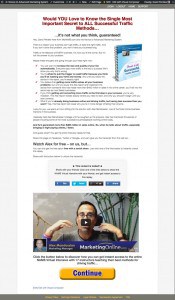
This is an image of the first landing page at the right. Click on the image to see a bigger version.

The best part (in my opinion) about the CCW tool is the questionnaire that forces you to write down the benefits, myths, fears, results, and other attributes of your product. Once you know your product better, and keep that information stored in your CCW project file, it becomes a little goldmine that you can refer back to anytime.

Like when you need to fix your landing page.LandingPageAfterCCW

In this example, the first landing page was kind of pitiful. It's lacking benefits, a description of the basic problem or any reason why you should get the free report. In fact, it doesn't even mention the free report very much.

Sell the transaction!

In the second landing page, you'll see that we've focused on the problem much more to identify why you would want to download the free report, added benefits, debunked some myths, and focused on how to get more of the solution to the problem.

So, how did I get the information to improve that revised landing page?

It's really simple.

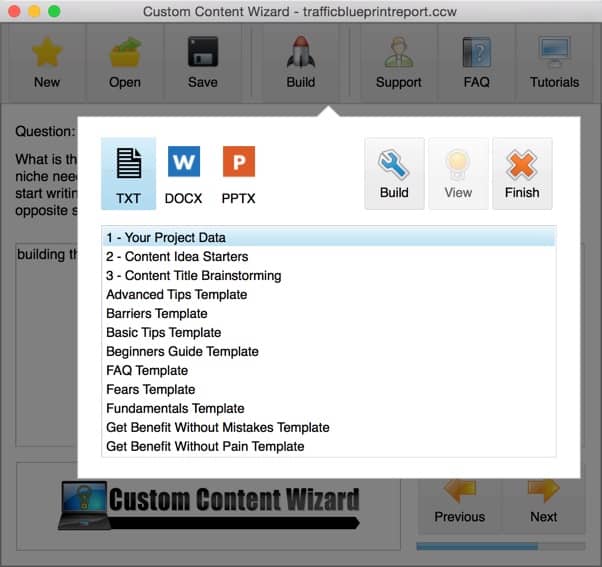
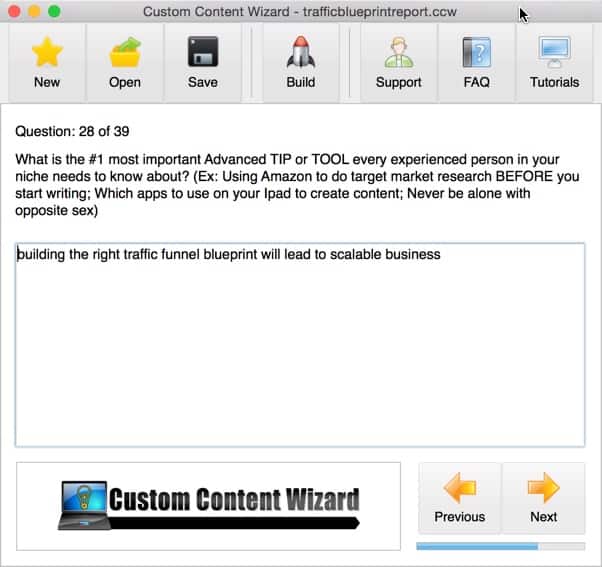
When you create your first project in CCW, you answer 39 simple questions. They're designed to force you to drill down into the product and pull out the key benefits, fears, expected results, and much more. And then you save the project file.CCWScreenShot2CCWScreenShot

The guided questionnaire is simple, but incredibly powerful.

Once saved, you can output your answers into many different templates and guides, but DON'T overlook the first three documents.

  1. Your Project Data
  2. Content Idea Starters
  3. Content Title Brainstorming

To fix the landing page, I opened the Project Data file and pulled half a dozen bullets from the answers I had already input into the system and transferred them to the new landing page.

That made all the difference in the world.

Immediately, the landing page became a much better sales tool focused on the reader, their needs, and the solution to their problem.

Fixing your landing pages is NOT an advertised benefit of the Custom Content Wizard tool, but there are many benefits to this little program that are under the radar.

Don't miss this tool.

Click the continue button below to check out a demo video of the tool.

I pushed Jeff and Jim Edwards to give you a special promo code for $100 off. They raised the price last week, but for the next 100 of MY community to purchase, you get a discount by using the promo code: dperdew100. (This is only good until Sunday night at midnight ET.)

Continue to Custom Content Wizard here

Category: Featured Content

Xbrander Sample

By David Perdew Leave a Comment

101 List building Tips

[xbrander file=3e0724fa]

Category: Featured Content

Custom Content Wizard

By David Perdew Leave a Comment

Finally, a REAL tool that helps make your content creation tasks so much easier…

I’ve been pounding on Jeff Herring​ all week long to get this to me so I could get it to you.

It’s called Content Creation Wizard. Jeff and Jim Edwards have partnered to take his templates and automate the content creation piece for articles, blog posts, autoresponder copy, video scripts – whatever you can think of.

We’re doing a sales webinar in two weeks, but this was so good I wanted to get it to you NOW (before it’s released to the public) for the Insiders Club content challenge.

And it’s a special price. Check it here

I got access to this a few weeks ago and it’s really amazing.

You spend a few minutes answering questions about your subject area and then you choose the type of template you want to spit out.

The software does it for you with a template containing your benefits, problems, solutions, tips, mistakes, or fears and doubts.

Then, you write a little bit and you got a new and VERY good document. Jen​ is using it to build some of our autoresponders as well as online content. Really awesome tool.

Be sure to watch the demonstration on this page.

Continue to Custom Content Wizard here

Category: Featured Content

Difference between 30 and 90 Day Challenges

By David Perdew Leave a Comment

I love Saturday!

Even when I’m working, Saturday’s a casual and very productive workday, you know? People don’t interrupt me, and I can really get a lot concentrated tasks completed.

It’s not yet noon (as I’m writing this) and my wife and I have already accomplished quite a bit on this Saturday.

  • I ran 4 miles this morning before 7:30 AM (yeah me!)
  • She and I went to Starbucks in town for coffee and our weekly business / family meeting
  • We planned our two Mastermind dates for the new VIP Members who joined us last week
  • We reworked our calendars to include the new coaching schedule that the Elite and VIP members get, and focused on the delivery schedule starting Monday
  • Now, she’s cooking for the Mother’s Day celebration with her 92-year old mom, and her niece and nephew tomorrow
  • And I’m at the office for a couple of hours working on the videos for the remainder of this month’s Video Marketing challenge

Are you busy or productive?

Big Picture - Seeing your future in Crystal BallAn essential element of accomplishing quite a bit is to focus on the BIG Picture.

That’s what the 90-Day Challenge is all about.

Without a big picture for your business and your life, you can’t possibly know that what you’re doing today will move you toward that goal.

But the good news is that it's completely up to you. You get to pick. It could be financial security, family relationships, health and wellness, or anything else you want.

But frankly, without knowing YOUR big picture, you don’t have a clue where you're headed. You're just going somewhere - anywhere.

There’s a huge difference between “being busy” and “being productive.”

Being productive means you’re tasks are moving you toward your ultimate destination.

My mother teases me all the time when she rides in the car with me saying, "It's not a car trip with David unless you go through a parking lot or two..." And it's true. I can't stand sitting still. I don't like to waste time. So, I will cut through parking lots to keep moving forward. (Even if I'm going in the wrong direction sometimes...)

So what is the 90-Day Challenge?

First, we also refer to it as the NAMS Academy and will eventually rename it completely to that.

Someone asked me the other day, "What is the difference is between the 90-Day Challenge and the Insiders Club 30-Day Challenges?"

The answer is simple.

The 30-Day Challenge – the monthly Insiders Club challenges – is specifically about essential business techniques. The Insiders learn more about these topics in a focused and collaborative way each month because every online business should be using these tactics to improve their business.

And they do it as a team working on the same topic each month to support one another. It’s a very successful model.

The challenge schedule is:

January Easy Kindle Publishing
February Business Operations with Will Mattos
March Social Media Marketing and Advertising
April Outsourcing Solutions
May Youtube Video Marketing
June Affiliate Marketing
July List Building Essentials and Advanced List Building
August Content Creation
September Simple Product Creation From Scratch
October Traffic Mastery
November Found Money: How to Create Passive Income
December e-Mail Marketing Mastery

The 90-Day Challenge (NAMS Academy) is completely different.

It is about you and your goals - or the BIG Picture in your life.

You start with a goal, and for 90 days, we focus on how to help you achieve that goal.

The small group in your experience track, led by me in a weekly hangout, supports you in that process.

For example:

  • Kelly McCausey wanted to add $15,000 in additional revenue to her income. She did $17k.
  • Ellen Finkelstein wanted to expand into new digital products with recurring income. She’s created a couple of new courses and coaching programs.
  • Debra Lloyd wanted to add $2000 to her monthly recurring income so she could have more flexibility to help her parents. She added $7k.
  • Gary Huff wanted to integrate two businesses he purchased and generate a couple of thousand per month in automated sales. He nearly doubled that goal.
  • Paul Taubman wanted to leave his job with integrity and without financial concerns. He did that right on schedule.
  • Karen King wanted to find a direction that used her skills and talents to drive a new path to part-time income while continuing her full time job. She’s now coaching students on publishing their books.

There are many more success stories. And we’ve only conducted two 90-Day Challenges.

How do you achieve your Big Picture goal?

Fortunately for you, we have another starting on Monday, May 11.

We already have 29 people signed up to start. Elite and VIP Members have lifetime access to the NAMS Academy so they can take the 90-Day Challenge whenever they want.

The 90-Day Challenge is going up in price to $3500, but right now, we’re offering it for $2500. It’s a great deal. Notice how many people in the stories above made so much more than that…

But I’ve got a better deal for you.

Join the MyNAMS Elite Club and you get all the benefits of the NAMS System for life.

Seriously!

That includes:

  • Lifetime: All Future 90-Day Challenges - group coaching (next starts May 11)
  • Lifetime: Daily eMail Coaching access
  • Lifetime: Open Office Hours one-on-one calls on Tuesday from noon to 2 pm ET
  • Lifetime: Insiders Club - never pay again
  • Lifetime: 2 tickets for each NAMS Workshop for life

Basically, you don't pay for anything else unless you decide to upgrade to the Mastermind or VIP levels.

Did I say all of those are lifetime?

The Elite program is $5k, but you won’t pay that if you get in before we start the next 90-Day Challenge on Monday at 7:30 PM ET.

You're getting an instant $1000 credit just for reading this blog post if you join the Elite program before the next 90-Day Challenge.

The credit makes your upgrade price just $4000. And you can even do 3, 6 or 12 payments.

Click the button below to see the payment plans.

addtocart

Remember, the next challenge starts Monday, so let me know if we can count you in.

And if you have any questions, just shoot them over to me here.

WARNING!

arrow-right

Do NOT Miss This Important Message!

Because this is a lifetime HIGH VALUE offer at a reduced rate, there are no refunds for this program. Period.

I would love to see you in this program. See you there.

David Perdew

PS: This $1000 instant credit will disappear at 7:30 PM ET, Monday, May 11. Don’t miss this opportunity to get everything in the NAMS System for life. (VIP and Mastermind Programs are not included.)

Category: Business Operations, Featured Content

  • Previous
  • 1
  • …
  • 16
  • 17
  • 18
  • 19
  • 20
  • …
  • 59
  • Next
  • Help Desk
  • Contact
  • Support
  • Privacy Policy
  • Earnings Disclaimer
  • Legal Notices
  • Membership Agreement
  • TOS
  • Testimonials
  • Affiliate Disclosure

Copyright © 2025 · MyNAMS.com · All rights reserved
NAMS, Inc. 203 CR 890, Etowah, TN 37331 USA

Disclosure: Some links on this website may be affiliate links. If you make a purchase through one of our affiliate links, we may earn a commission.
We only endorse products and services we use or trust.