Novice to Advanced Marketing System

NAMS | Building an Online Business to Support Your Dreams

  • Home
  • Product Catalog
  • Free Resources
  • Affiliates
  • Support
  • Blog
  • Masterminds
    • NAMS 90 Mastermind
    • Affiliate Sales Dominators Mastermind
    • Idea To Income Mastermind

Want to Make Money While You Sleep?

By 1 Comment

Have You Ever Wished You Could
Make Money While You Sleep Or Vacation?

Make Money While You SleepWho else wants to make money without
constantly trading hours for dollars?


Selling products online can make this a reality. If you want a product that requires the least amount of hassle to deliver and the highest profit margin, a digital information product is ideal. Information products can take many forms:

  • Videos
  • Reports
  • Guides
  • Manuals
  • Software
  • Audios
  • Kindle books
  • Virtual Summits
  • Webinars
  • Courses
  • Memberships and more!

If you know something the average person doesn’t … if you know how to solve a pressing need for a big enough group of people … there could be an information product in you.

When you think about transforming your knowledge, expertise, or life experiences into an information product, you probably have lots of questions that come to mind.

  • What do I know how to do that people will pay for?
  • Is my idea viable as a product?
  • Does anyone really care about what I have to say?
  • How do I take my very personal experience and translate it into a system other people could follow and use in their own lives?
  • How do I find the people who would want to buy my information product? How do I get them to come to me?
  • What if I spend a bunch of time and money creating a product and never sell a single one?
  • I have several ideas, how do I know which one to pursue first?

Notice that all these questions are about you and your fears, concerns, and your personal success or failure. The first step to creating a phenomenally successful information product is to get the focus off you and shifted onto others.

“What others?” you may wonder.

The people you’re going to serve with your information product, that’s who!

When you focus on your potential customers, things start to shift. Here are some questions you should be asking instead:

  • What types of questions do people frequently ask me?
  • What types of people tend to come to me for help? And for what?
  • What types of people really make me feel happy and fulfilled when I’m able to assist them?
  • What are the most pressing problems for these people?
  • What keeps them up at night?
  • How would they describe their problem? What words would they use?
  • How is their problem negatively impacting their lives? Their career? Their family, friends and dreams for the future?
  • What is this problem costing them in time, money, resources and lost possibilities?
  • How are they being blocked or stopped by this problem they’re facing?
  • How would their lives be different if this problem disappeared tomorrow?
  • What would they be able to do, be, have or experience if the problem were magically gone?
  • If one of these people were standing in front of me today, begging for my help, what is the first thing I would tell them? The second? The third? The fourth? Etc.

When you shift the focus off yourself and onto the people you’re here to serve, you start listening better. You start paying attention to the people who are coming to you and you see the common threads and the vocabulary they use. You listen with your heart to the challenges they face, their hopes, fears, longings and frustrations. This gives you an inside track on the very best products to create.

Asking yourself these questions and others will lead you along a bread trail. Follow the bread trail. It will help you create a product for people who desperately need solutions only you can provide. That’s right! Even if you offer a solution others sell, there are some people who are only going to receive it from you. You’re the person on this planet who is meant to provide their answers.


     
To get started on your information product, please join us for our September 30-Day Product Creation Challenge in the MyNAMS Insider Club. You owe it to the people you’re here to serve to offer them the hope, healing and solutions they need. Continue to Custom Content Wizard here

insidersclub-1

Category: Featured Content, NAMS Notes

How to Create Optin Funnels that Pay for Themselves

By jen Perdew Leave a Comment

optinfunnelwithroi-768x4248.jpeg

insidersclub-1

Category: Featured Content

What Triggers Make Your Customers Buy?

By Jen Perdew Leave a Comment

How Would You Like to Get a 226% Increase in Sales Conversions?

Yep, sure!

Who wouldn’t like to see that kind of massive conversion increase?

Of course that’s the holy grail of every online business:bigstock--123847871-450

Find simple and inexpensive ways to increase conversion
dramatically with the traffic that you already have.

My friend Terry Dean, one of the best online marketers around, focuses on conversion techniques for all of his coaching clients.

And one of his favorite sayings is, “You don’t have a traffic problem; you have a conversion problem.”

Of course, without any traffic at all, conversions don’t matter.

But if you have even a little bit of traffic, and you want to increase your conversions dramatically, the fastest and easiest way is to add scarcity to your offer.

But there are dangers in using scarcity incorrectly.

Seize The MomentIn fact, it could backfire on you completely. But done well, scarcity can be a beautiful thing.

In a few minutes, we’ll look at a test by a clothing retailer that resulted in 226 percent increase in ROI.

Time limited offers have worked in every industry for centuries
If you’ve ever used coupons, bought a car on sale, gone to the Macy’s one-day sale, bid on any eBay auction, then you’ve been affected by time-limited marketing.

They all do it. And they do it because it works so well.

Case Study #1

Yaro Starak, a well-known online marketer, says,

"It became apparent that during a complete online launch process with a time based deadline (usually closing down of the offer, or a hefty price increase after deadline), that in the last 24 hours the total number of sales would increase by at minimum 50%, and could even double…

For example, if a product was ‘open’ for a week, and during the first 6 days I made 100 sales, then within the last 24 hours I’d make anywhere from 50 to 100 more sales.

This happened every single time."


bigstock--132454052

And He's Not Alone

Glance through JVZoo or any other online marketplace and you’ll see all forms of scarcity including:

Time limited offers with countdown timers (“tick-tock”)

Limited ‘in-stock’ availability (“only 3 more in stock”)

Seasonal offers (“Pumpkin Spice Latte available until Jan. 1”)

Limited production (“only 100 will be printed”)

Quantity limited (“only 19 left at this price”)

Free shipping offers (“free shipping if you purchase the next 20 minutes”)

Expiring coupons (“coupon expires on 4/1”)

Customer behavior (“1003 liked this product too”)

Limited production (“only 100 will be printed”)

The Fear of Missing Out

According to psychologists, scarcity actually creates a mini-crisis for someone and it focuses the viewer on taking action to alieve the condition.

They know if they don’t act now, they may lose out on a deal.

And it turns out that losing out, the Fear of Missing Out or FOMO, is the driving emotional factor behind most purchases.
In fact, researchers have shown that FOMO is twice as likely to drive sales as an opportunity to seek pleasure.

Scarcity increases customer desire because it forces action. You can’t really be a fence sitter if the product is not going to be available tomorrow.

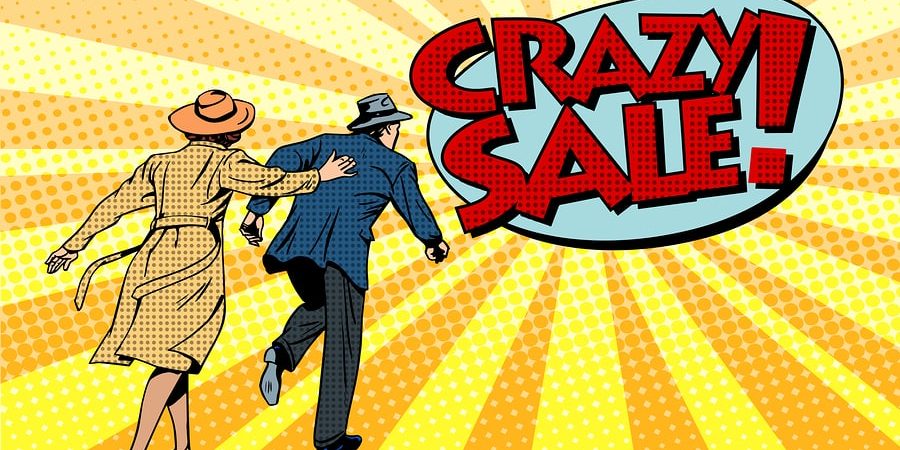
Crazy sale super discounts pop art retro style. The family runs to the store

The Elements of an Irresistible Offer

What does Terry Dean have to say about it?

In his Golden Glove, a marketing device which highlights the five elements of an irresistible offer, Terry Dean adds scarcity as the fifth and possibly the most important of the elements calling simply:
Reason to act now.

Without a reason to act now, people don’t have to take any action.

And they don’t.

If someone buys a product from you without scarcity, it means they have a desperate problem and need a solution right now, no matter what the price is.

What about price? Is price always the trigger in scarcity ploys?

No, there are many ways to INCREASE price because of scarcity.

Businessman Hand Giving Five Star Rating, Feedback Concept

We Can All Take A Lesson From Apple

When the iPhone first came out, Steve Jobs understood and used scarcity to maintain a premium price.

I knew the person at AT&T really well who managed the iPhone launch.

She dealt directly with Jobs. AT&T had the exclusive (another form of scarcity) contract to sell the first iPhone.

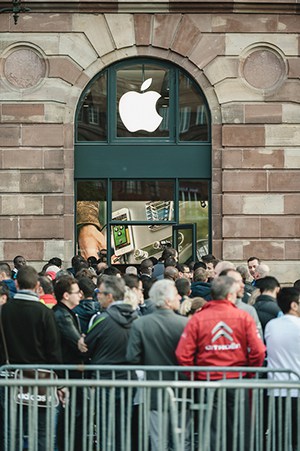
The launch date of the iPhone was months away, but set in stone because they had to leak it, then meet it to build anticipation. The company began taking pre-orders.

I don’t remember the exact numbers, but let’s say that Apple was releasing only 1 million phones on launch day.

Pre-orders were many times that number.

bigstock-Apple-Starts-Iphone--Sales-Wi-72223027-300px

Of course they could have. But the lines at the front door would have been shorter and no one would have spent the night in a tent on the sidewalk to make sure that they got the first iPhone.

Early adopters are the best friend of the scarcity tactic because they become the new evangelists with the coolest tools.

Apple was able to maintain that position for many years with every new launch. People that say launches don’t work should study Apple – they’ve mastered the launch.

And let’s talk about that launch date.

Launch dates build anticipation that result from a countdown.

And a countdown timer is shorthand to your brain that this is urgent.

And as we’ve said, our brain has a hard-wired response to urgent feelings, especially if we think we’re going to lose something, even if the loss is just an opportunity to get something.

In fact, scarcity actually makes people feel like something is more valuable – even when it’s not.

Case Study #2

What does a world class violinist have to do with this?

Let’s talk about Joshua Bell.

He’s a world-class, high-priced concert violinist. People stand in line for days to pay hundreds of dollars for tickets to see him perform in major halls across the world. 


As an experiment to see how people valued his music outside the concert hall, he decided to play a free, unannounced concert in the Washington, DC subway. That's him in the 2-minute video at the right.

Imagine that you walk into the station and hear this beautiful violin music coming from an ordinary man dressed in casual clothes.

There’s no sign, no press crew, no indication in any way that this man is special.

People ignored him, until one woman at the end recognized him and said she'd seen him play at "The Library of Congress..."

He is one of the most gifted and respected violinists in the world. This performance was free. People on the subway did not “value” him as much as when they paid for tickets in Carnegie Hall.

But the music was the same.

In the subway, Joshua Bell’s music was not scarce.

In the concert hall, it is. And the perceived value was in the concert hall, not in the common subway station.

That’s the difference.

So, what exactly is scarcity?

Remember when your mom or dad said, “You always want what you don’t have.”

Or perhaps my mother had nailed it when she said, “If I had a pile of dog poop, you’d want one too!”

Science of the brain tells us she was right.bigstock-headless-man-holding-surprised-45210907-300px

If you’ve got it, I want it. If I’ve already got it, you can have it.

Christmas morning is a great example. Kids often abandoned the race car or Barbie doll that they’d insisted they absolutely had to have because they saw something else under the tree.

That reaction is hard-wired in us.

Our brain releases measurable chemicals when we think we’re going to miss out on something.

The more difficult it is to acquire something the more value that thing has.

Rolls Royce automobiles are incredibly difficult to get. There’s a long waiting list.

But if you offer me free shipping in the next 20 minutes, my brain gets just as lit up as if I’d been put on the waiting list for a Rolls.

Why resist it?

redtimerSo, for years, I stuck my nose in the air and said, “I won’t use deadlines and scarcity gimmicks in my marketing. That’s ridiculous!”
Boy, was I wrong.

If you want to sell something, you have to add a deadline.

But if you overdue it, then people don’t believe you. That’s why when we build the Simple Conversion Commander plugin, we did so with the requirement that it manage marketing campaigns so that an offer was gone when it said it was gone.

That’s just keeping your integrity tidied up.

But the other benefit is that it helps train your people to pay attention. If you say it’s gone at midnight ET, then it should be gone at midnight ET. Not PT, or MT, but ET.

Then, the next time a promotion runs and it says midnight ET, folks will know. After midnight and you’ll lose out.


Case Study #3

Remember that 226 percent ROI increase?

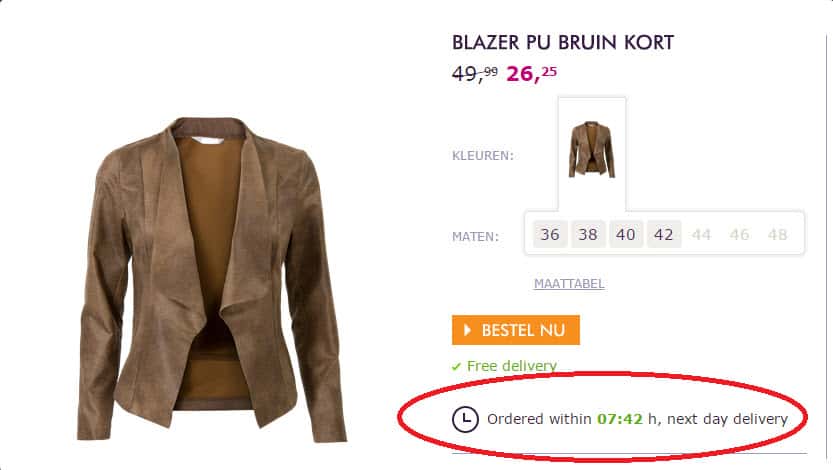
That came about with one little change to an online ecommerce page where a Dutch retailer was selling a suede jacket. The results are  below.

Look closely and you'll see one little thing that makes all the difference in the world.FreeShipping26%ResultsIncreaseAYep, it's the scarcity element.

The test was very simple.

The first listing, call it Test A, was exactly the same without the scarcity element.

The second listing, Test B, added the inline text timer to off next day delivery. It doesn't even offer "Free" next day. It just says to order before the timer goes down and you'll get it next day.

That simple change - adding a scarcity element with a timer - resulted in a 226 percent revenue increase on that listing.

That's powerful!

Over the two-week test, the conversions went from 3% (on the page without the timer) to nearly 7 % regularly with nearly 50,000 visitors. All day long!

The timer had a major (and predictable) impact according to the website WhichTestWon.com.

If you add time-limited scarcity in a strategic way, your results could be similar.

Finally, there's an app for that...

Managing your marketing campaigns to include scarcity is truly a mechanical
process. It’s a set-it-and-forget-it affair. Or at least, it should be. 

I’ve stayed up many nights to change the price on a page.

Or close down an offer.

Or redirect a page to a new page.

And it’s a pain to do that.

The Simple Conversion Commander is the tool that does just that. It’s a WordPress plugin, but works with raw code for non WordPress sites.

To add scarcity to your posts, be sure you check that out.

Check out Simple Countdown Creator here!

Category: Featured Content, NAMS Notes

Case Study: How we got a 605% ROI on a month-long affiliate contest using Diversified Listbuilding techniques

By David Perdew 2 Comments

Case Study: How we got a 605% ROI on a month-long affiliate contest using Diversified Listbuilding techniques from a cold list using Facebook Advertising

     
[easyoptinbuildersimple eoboptinsid="eoboptin10"]

First, what is Diversified Listbuilding?

Ok, I made it up.

But I think it really represents the concept well: Having lists of prospects in multiple systems that drive long-term commissions to protect you and ensure that you balance out your online business portfolio.

What’s the tried and true advice in stock market investments? Diversify your portfolio, right?CaseStudy-605ROI

That’s what we’re doing here.

A few years ago, our site was hacked by a seriously bad dude. He ended up in an ugly jail in Jordan.

We had to shut down for 6 weeks and lost about $70,000 in expense and revenue. But what kept us afloat was that we had lots of commissions coming in from other sources such as our affiliate partnerships.

That was key to our survival.

And taught me a huge lesson. I don’t want to always have to promote products to make affiliate dollars. Instead, I want to build partnerships and relationships that reward us for past and future efforts as much as possible. So, we try to get as many recurring commission opportunities as possible.

That’s the way we built our NAMS affiliate program, so we look for others that do the same.

This case study is about how you can do exactly the same thing and reap the same rewards we have.

[easyoptinbuildersimple eoboptinsid=”eoboptin10″]

This is important!

You don’t need a website, list or your own products to begin getting commissions every month and growing your business if you follow this method.

It’s simple and easy.

And rewarding. A 605 percent ROI means that on the $500 dollars we spent on Facebook advertising, we received $3000 back.

Not too shabby.

So, there’s nothing holding you back except… well, have you looked in the mirror lately. That’s the culprit.

Ask questions below in the comments or tell us about your progress with Diversified Listbuilding.

insidersclub-1

Category: Featured Content, NAMS Notes

Create a Graphic Banner with Photoshop

By David Perdew 4 Comments

How to Create Marketing Graphic Banners with Photoshop that Get Great Results!

We live in a graphic world.

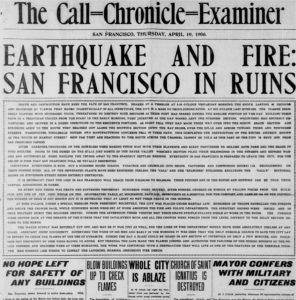
SanFranciscoChronicleFireOne hundred years ago, people–who could–read. And they read a lot. Long books. Gray, type-heavy newspapers.
Even a spectacular news story like the 1906 San Francisco earthquake and fire that destroyed much of the old city was told in long lines of fine text.

To get the details of the story, one had to invest a little time and read the entire thing.

  • Bullets didn’t make it skim-able.
  • Sub-heads didn’t break up the text.
  • Color didn’t catch your eye.

Reporters learned to write with the most important information at the top of the story and the least important at the bottom. That way, when readers had enough, they could stop any time. Or if a story ran longer than the available space on the page, it could be cut from the bottom.

But over the years, newspapers, magazines and advertising evolved to communicate faster with fewer words, and more images.

People were busy. They didn’t have time to read like they did earlier.

We barely have time to tweet today.

“Just the facts, ma’am, just the facts.”

“Just the facts, ma’am, just the facts,” was Sgt. Friday’s favorite admonition on the old TV program, Dragnet, when a witness would go off on a tangent.

In my 17 years in the newspaper business, editors had to learn how to appreciate if not create graphics to pull out just the facts for the readers because they were reading less. The audience was becoming much more impatient.

Now, everyone is an editor and a publisher. If you have a blog, you must know how to create graphics to communicate the facts fast.

The rules still apply. Readers want to get the information quickly.

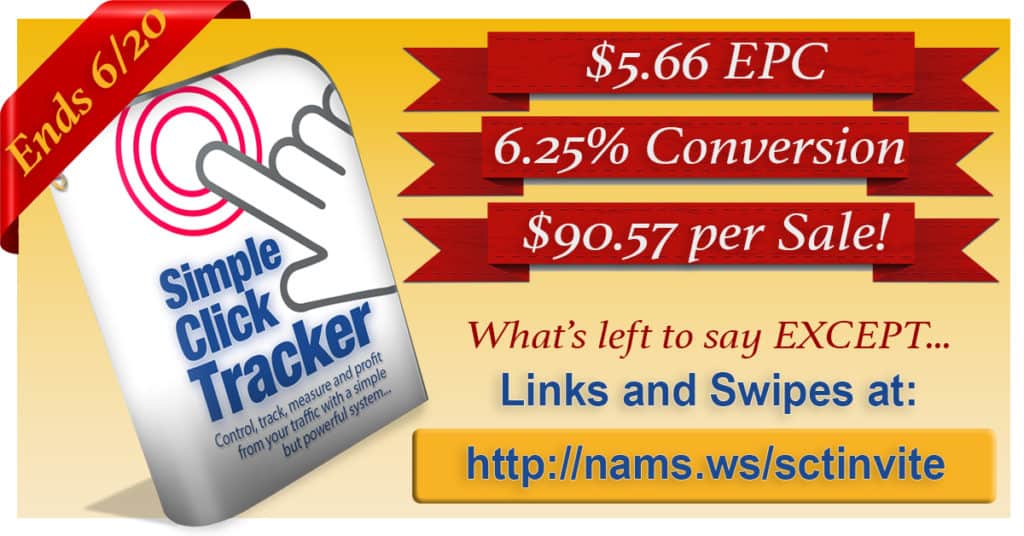
That’s why you need to know how to create images like the one below—a banner graphic used on social media, your blog, or in articles elsewhere.

SCTSalesBannerIn this case, we needed to “announce” the results of our latest product launch to potential Joint Venture partners before the event was over so we could drive more sales.
The banner graphic had to fit the recommended newsfeed image size on Facebook—1200×628 pixels.

Thank goodness we now have Photoshop as an affordable, versatile and incredibly powerful tool to create graphics quickly.

But when you hear the word “Photoshop,” you might have a little bit of panic roll down your spine.

But don’t worry. It’s not nearly as tough days – or as expensive – as it was in the old days. In fact, it’s an incredibly versatile and powerful tool that you can get for less than $10 per month.

In today’s demo, I thought I’d show how I created a quick graphic in Photoshop that pulled in great results. I created this graphic below in less than 30 minutes. And I’m NO graphic designer!

What’s the goal of the graphic?

With only a couple of days left in the launch, we needed to increase the buzz about the Simple Click Tracker launch to convince JV partners to take another look at this promotion.

It was a higher ticket item for a JVZoo launch—between $47 and $147 depending on the license version.

So, the conversions on the front end were lower, but the Earnings Per Click (EPC), Conversions and Revenue per Sale were excellent.

So, our goals were simple:

  • Get the word out!
  • Focus on the numbers.
  • Make potential partners aware of the deadline.
  • Highlight the link to get the promotional tools.
  • Create more buzz.

The graphic I created had to communicate fast because it would be seen on Facebook mostly.

That’s a scrolling environment. No one is going to read much of anything. They are looking for something to catch their eyes.

If it works, people will see, be drawn to it, then act on it.

And it worked. On an 11-day launch, 36.4% of our sales came in the last day after we published this graphic

With results like that, you can see the importance of being able to create simple graphics that communicate your message extremely fast.

Nothing is better or more flexible at doing that than Photoshop.

Since it was first introduced on Feb. 19th, 1990, this software has gotten much easier to use, not harder. I should know. I’ve been using it since about 1995.

And in 1995, I probably paid about $1000 for the software. Today, you can get it for less than $10 per month if you subscribe annually.

So, let’s look at how I created that banner

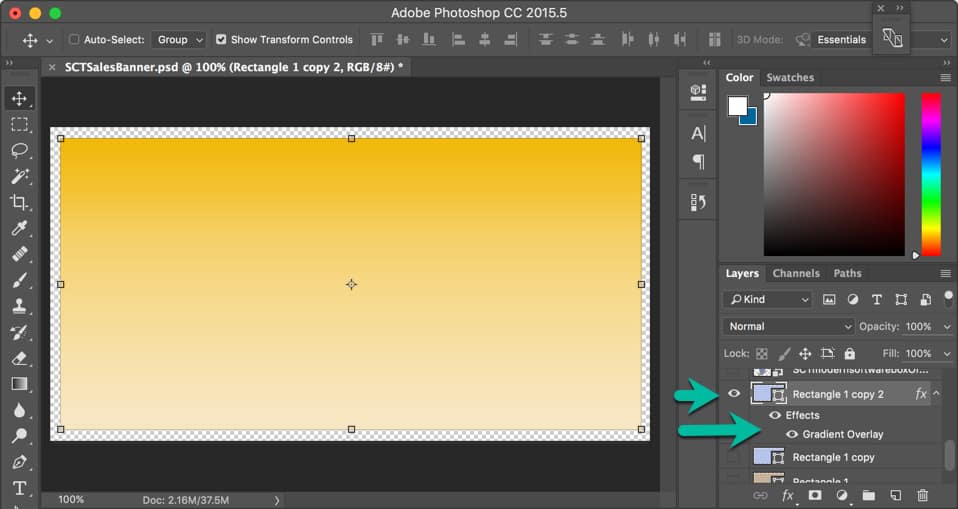
First, I created a new canvas. Think of that as the background for my image. The size was consistent with the Facebook newsfeed—1200×628 pixels.

HowToPhotoshopBanner01

Next, I drew a rectangle using the shape tool.

An important note about Photoshop fundamentals…

Everything is based on layers. And once you understand the layers and how they are stacked in the project, called a .PSD file, you’ll love it.

You can arrange your workspace anyway you like by undocking many of the panels. I like to keep mine together and work in the canvas area—kind of an old school approach.

The layers are loaded in the right sidebar in the Layers panel.

Layers are stacked from top to bottom. The top layer will over the one below. Imagine that we had 5 layers in this order below:

  • 5
  • 4
  • 3
  • 2
  • 1

Layer 1 would be the background. And Layer 5 would be the viewable text on top. If you moved Layer 5 below Layer 1, the text would be behind the background and not visible.

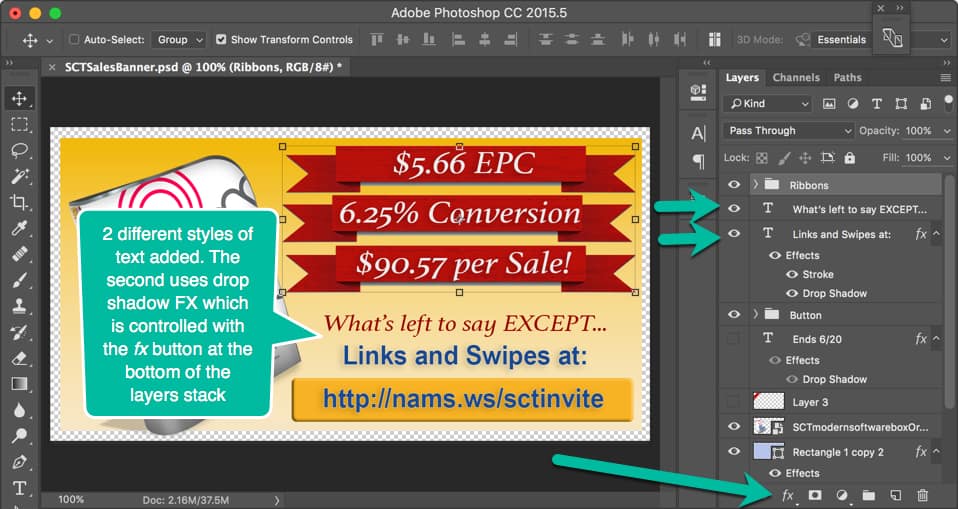
A layer can be toggled on and off by clicking the eye icon. (See the green arrows.)

My first step was to create Layer 1 – the background. I added a rectangle just a bit smaller than the canvas area. You’ll see why at the end.

With this rectangle, I wanted a gradient background that would act as a not-too-subtle background, but also work with the type colors and other elements. So, I click on the fx button below and added the gradient overlay.

I won’t go into the specifics of how to do that because there’s other great training for that.

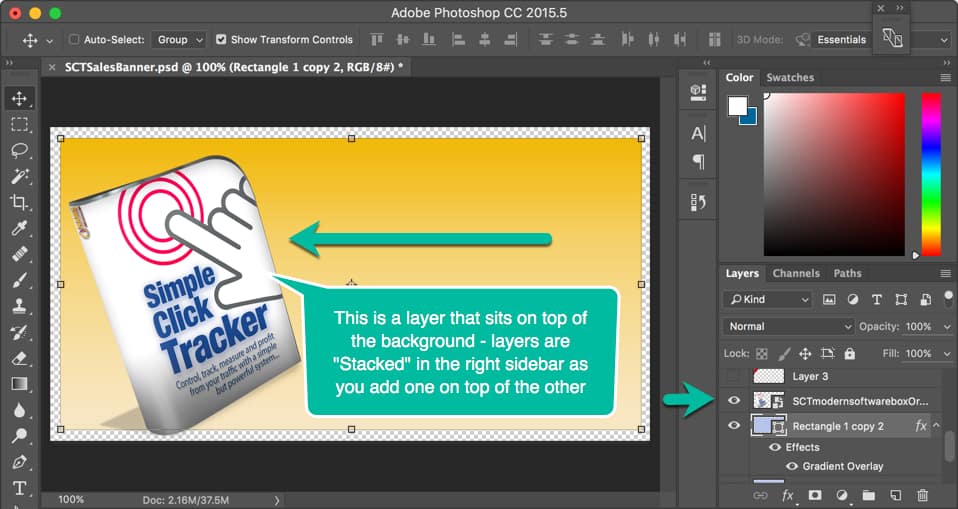
Next, I added my Simple Click Tracker software box graphic that I created in another simple program.

I dragged that image from my file explorer right on to the gradient background and gave it about a 15-degree spin by grabbing the image handles. With those same handles, I could resize the image.

HowToPhotoshopBanner02

The software box image created another layer that sat on top of the background. Notice the layer in the right sidebar is above the background rectangle.

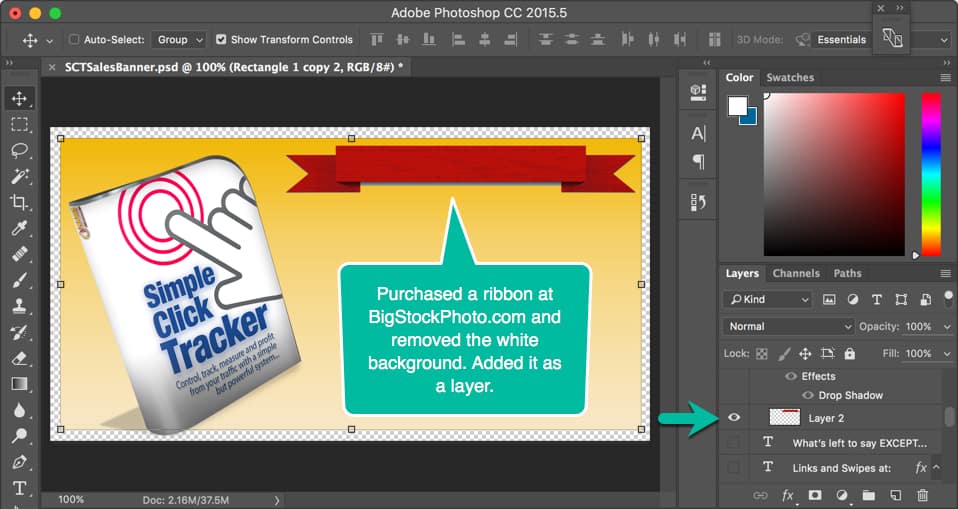
I had 3 great promotion numbers I wanted to highlight quickly, and I decided to do that by putting text over a red ribbon that “announced” the fact.

HowToPhotoshopBanner03So, I purchased the correct ribbon from BigStockPhoto.com. (I usually buy 100 photo credits there a couple of times a year for about $175. An entire sheet of ribbons of varying sizes and shapes was 1 photo credit so it cost me about a $1.75.)
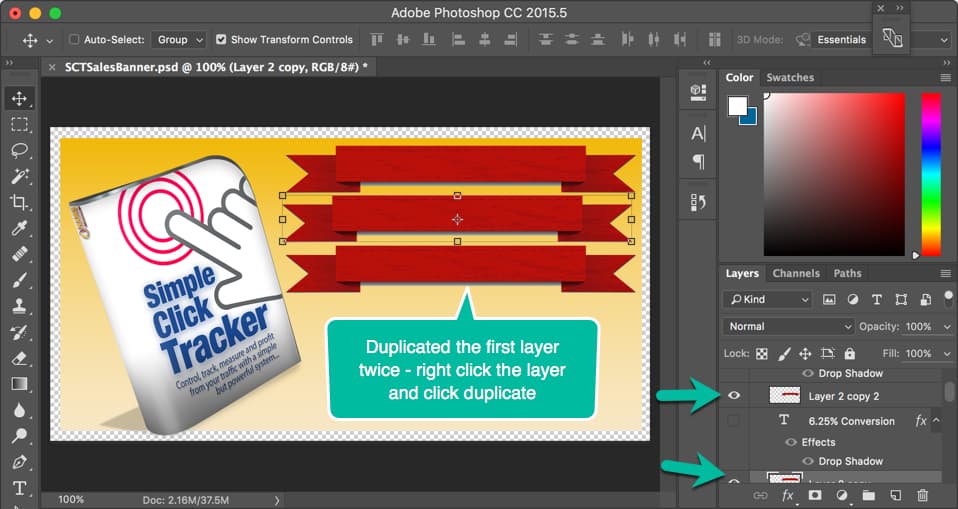
I drag the ribbon onto the image, grabbed the handles and resized it.

HowToPhotoshopBanner04

Once I had the ribbon positioned and sized as I wanted it, I right clicked the layer (in the Layers panel at right over the words “Layer 2”) and clicked “Duplicate Layer.”

It automatically created an additional layer with the ribbon in place.

I repeated that process since I had three ribbons, one for each number I wanted to highlight. See the image above.

HowToPhotoshopBanner05

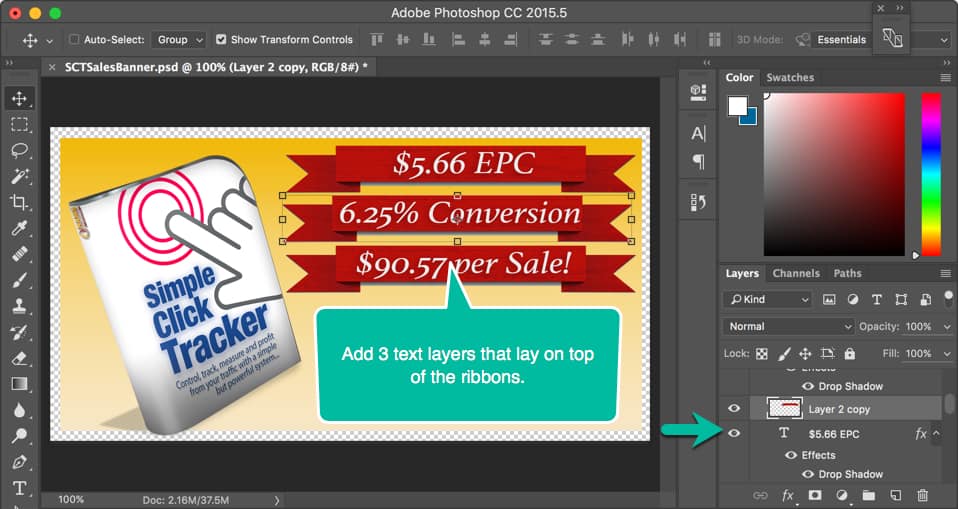
Next, it was time to add the text over the ribbons.

By choosing the text tool from the left tools menu icons (it’s the capital “T” in the left side at the bottom in the image below), I added the first text layer, chose the font, the size and the color.

I duplicated that layer twice and edited the text to add the next two number announcements. Then, I positioned them over the red ribbons.

As you can see, I’m just building up this image one layer at a time.

At first, that can seem a little confusing but once you get the hang of it, you’ll love the ability to turn layers on and off by toggling that “eye” icon in the Layers panel as well as organizing them by folders.

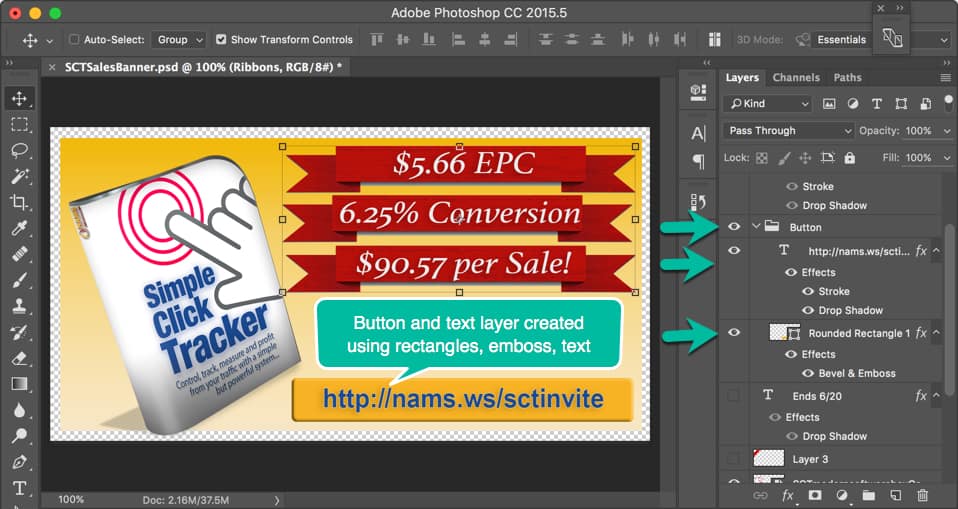
Below, I added a twist by creating a folder for the button because I knew that I could resize, move or edit the entire button at once if it were grouped in a single folder element.

HowToPhotoshopBanner06

So, you’ll notice in the Layers panel, a folder icon at the first green arrow and the label Button. The “Button folder” contains two elements:

  • A rectangle that has been shaped using the emboss effect to look like a raised button, and
  • A text layer with a URL added as the text.

This gives the image the look and feel of a clickable link.

That’s good because I want them to click on the image to find the link in the caption. Facebook doesn’t allow clickable images, but you can include the link in the caption and it IS clickable.

HowToPhotoshopBanner07

Next, I added two text layers with VERY succinct copy to drive viewers to go to the link in the button.

The text layers were styled using the fx options indicated by the bottom green arrow.

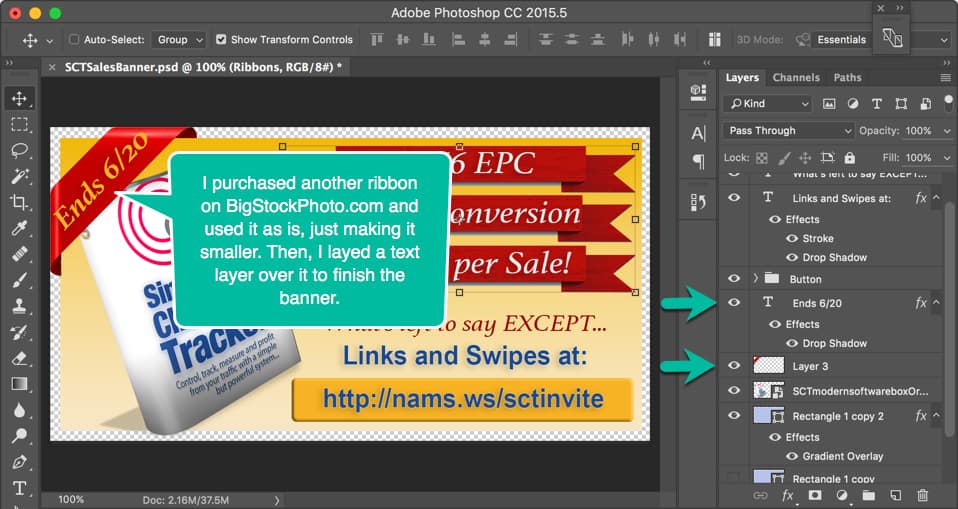
With one more photo purchase from BigStockPhoto.com, I grabbed another ribbon to highlight the corner and added the text layer over that with the ending date for the promotion.

HowToPhotoshopBanner08

We associate corner ribbons with important announcements like “NEW,” “Version 2.0,” “Sale,” or other timely points. This is no different. I wanted the deadline to get special attention.

Notice how I made the illusion of the ribbon wrapping around the rectangle by making the background just a few pixels smaller than the canvas and adding the corner ribbon completely to the edge of the canvas.

Remember, I did that in the beginning because I had planned all along to have a corner ribbon “wrap” the banner.

The little curl-under effect was already on the corner ribbon when I purchased it, so I had to resize it to fit. When you get it aligned properly, it gives it that 3-dimensional illusion.

SCTSalesBanner

Once again, the finished image communicates exactly what I wanted it to say in as few words as possible with the right highlights.

Okay, I buzzed through this pretty quickly.

And yes, there are a lot of little things that you have to learn if you plan to use this incredible tool. I only learn enough to get done what I want to get done. By no means am I a Photoshop expert.

And you don’t have to be either. Once you learn the basics, you’ll zip around in Photoshop and you’ll never go back to your old—and more limited—graphics programs.

This demonstration uses some of my Photoshop skills specifically to show you how I combine graphics and marketing to get results. That’s the key. These skills were simple and easy to learn.

Don’t stop there.

If you want to get really friendly with Photoshop, check out Photoshop Friendly taught by Kelly McCausey and Samantha Angel.

Kelly & Sam are self-taught Photoshop users. They know well the features needed to create web graphics and what areas of Photoshop they’ve never needed to familiarize themselves with.  They have an incredible eye for design and a no-nonsense teaching style that you’re going to enjoy.

You’re not going to hear a lot of tech-speak. They’re not going to fly through demos at the speed of light, expecting you to just ‘catch up’. They’re breaking it down into chunks that you can refer back to.

Best reason yet, they’re giving you a chance to submit weekly project assignments for feedback and suggestions for improvement.  This is optional but I hope you decide to take advantage.

Click the button below to find out more about Photoshop Friendly training and the next class.

Coupon$30Off

Continue to Custom Content Wizard here

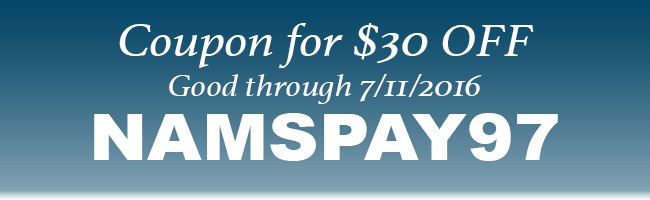
Click the button above to take a look at the Photoshop Friendly training and be sure to use the coupon NAMSPAY97 to get a great deal on the already underpriced live training from two REAL Experts!

Category: Featured Content

  • Previous
  • 1
  • …
  • 20
  • 21
  • 22
  • 23
  • 24
  • …
  • 62
  • Next
  • Help Desk
  • Contact
  • Support
  • Privacy Policy
  • Earnings Disclaimer
  • Legal Notices
  • Membership Agreement
  • TOS
  • Testimonials
  • Affiliate Disclosure

Copyright © 2026 · MyNAMS.com · All rights reserved
NAMS, Inc. 203 CR 890, Etowah, TN 37331 USA

Disclosure: Some links on this website may be affiliate links. If you make a purchase through one of our affiliate links, we may earn a commission.
We only endorse products and services we use or trust.