Novice to Advanced Marketing System

NAMS | Building an Online Business to Support Your Dreams

  • Home
  • Product Catalog
  • Free Resources
  • Affiliates
  • Support
  • Blog
  • Masterminds
    • NAMS 90 Mastermind
    • Affiliate Sales Dominators Mastermind
    • Idea To Income Mastermind

Getting the Most From Retweets

By David Perdew Leave a Comment

How Retweets Work and Using Them to Grow Your Traffic

Retweets are probably the most over-used and least understood feature of Twitter.  Yet using them correctly can help grow your traffic like no other strategy.

“Retweeting” simply means sharing someone else’s tweet with your followers.  It’s a mark of endorsement and recommendation, telling them “this person has something of value to share”.

Getting your link or post retweeted by industry influencers can boost your reputation and status almost instantly.  And if many of your followers retweet your link to their followers… who in turn retweet it to their followers… it can mean instant Twitter success.

(The key, of course, is producing posts that powerful.

How to Retweet

There are two ways to retweet a tweet:

1.    Simply hit the little “Retweet” button that appears at the bottom of every tweet when you mouse over that area.  This makes Twitter retweet it as is, automatically.

1-retweet

2.    Manually retweet it.

To do this, open up a new tweet textarea box (in the top-left widget on your feed page).

Type “RT” plus the person’s handle.

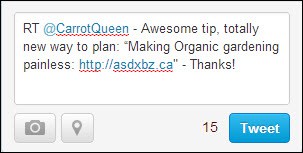
Copy-paste the tweet text.  Paste it after the “RT @handlename”.  Like this…
2-copy-paste

This will immediately show you the number of characters left for you to add a comment of your own.  And here’s where so many people lose their traffic-growing and engagement opportunity:  They write tweets that are simply too long to manually customize and retweet.

There is no room left for customization or endorsement.

Think about it:  What will ultimately bring you more traffic?

  • Posting a tweet that uses up all available characters, so people have no choice but to impersonally press the automatic “Retweet” link
  • Leave room for people to make positive, personal comments that act as both validation and a highly-personal testimonial

Let’s take another look at our Retweet of @CarrotQueen’s original post, which is highlighted in aqua…

3-leaving-room

Notice how much room she left.  Enough for us to type “RT @CarrotQueen”, then add a personal reason stating why we loved her post enough to retweet it.

That is the sort of retweet that:

  • Makes people also interested in the topic being retweeted sit up and take notice
  • Go check it out
  • Follow @CarrotQueen

Be sure to mix retweets in with other post types.  Whatever you do on Twitter, it should feel like a natural action, a normal conversation.  If you retweet sparingly, resisting the urge to reciprocate straight away for everyone who retweets your posts, people will sit up and take notice, when you do find a diamond you want to share.

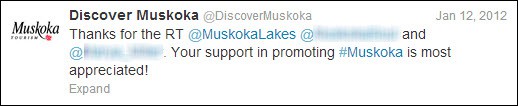
So you don’t have to start reciprocal retweeting – but it is good policy to acknowledge and thank anyone who retweets your post – as quickly ask possible.
4-thanks

 “How Do I Find Out Who Has Retweeted My Posts?”

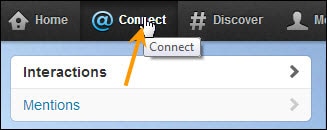
That’s simple.  Just go up to your top menu bar and click on “Connect”.
5-connect

You will immediately be able to see:

  • People who have mentioned you in their tweets
  • People who have retweeted your tweets

To find all activity involving retweets, select “Interactions”.  You’ll see a list – and you’ll instantly be able to acknowledge anyone you missed.

“How Do I Turn Off Serial Retweeters?”

In your zeal to take advantage of retweet power, there is one type of tweeter you never want to become – the Serial Retweeter.

This type of tweeter is often just sheer lazy:  He sends automatic retweet after automatic retweet because he can’t be bothered to write an original post – let alone a personalized recommendation.

He’s letting other people do his work for him.

You will probably come across Serial Retweeters before too long.  They clutter up your feed and are a nuisance.  Here’s how to get rid of them without necessarily unfollowing them…

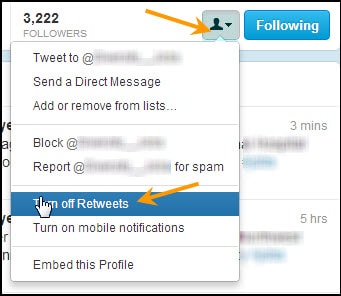
1.    Click on the Serial Retweeter’s Profile Photo.  This will open up his or her Profile.

2.    Click on the icon to the left of “Following”.  Select “Turn off Retweets”.
 6-turn-off-retweets

There is one good reason not to rush into getting rid of people who retweet a little too often:  Studying their example can be a powerful teacher of what not to do!

Ten Tips for Powerful Retweeting

Retweets can give you no results, “okay” results or noticeably effective results.  To increase your chances of attaining the latter, follow these ten well-proven tips…

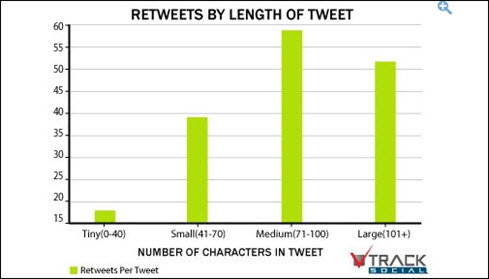
1.    Keep your character count between 70-100 characters, if you want your tweet retweeted.  As proof of what we were saying earlier, check out the graph screenshot, below.

Business Insider published the results of an analysis performed by Track Social, which showed the optimal number of characters that got retweeted.
7-graph-track-social

2.    Retweet relevant tweets.  That might seem pretty obvious, but it’s important enough to stress.

3.    Be choosy in what you share.

4.    Don’t just retweet tweets: Take the time to visit your prized Twitter connection’s blog or website and share content directly, if you think it’s truly going to interest, amaze, help or entertain your other connections.

5.    Don’t be monotonous when retweeting.  Don’t always retweet links.  Don’t always retweet quotes.  Don’t always retweet tweets by others.  Mix your tweet types – and intersperse tweets with retweeting.

People who always send the same type of tweets quickly get “tuned out”

6.    Study other people’s retweets.  Study retweets of people who have retweeted your posts.  Which ones leave you cold?  Which are confusing?  Which are effective?  Which retweets pleased you most?

Being observant is one of the greatest teachers you could have.

7.    Remember that tweets containing links are shared more often than those without.  Understanding this cultural practice should help you increase your retweetability.

8.    Retweet when your target market is most active on Twitter.  One of this social network’s biggest drawbacks has always been how fleetingly tweets appear and are lost in the never-ending stream.

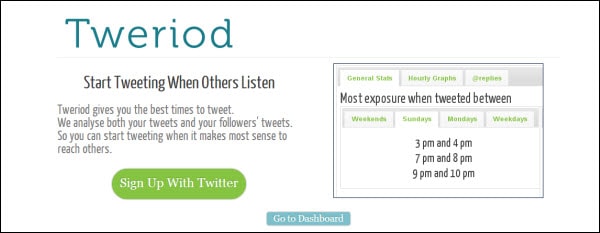
Metrics site Tweriod recommends doing so between 2—6p.m., if you’re not sure when your target audience is there (or there is too much traffic at other periods that might work better).
8-Tweriod

9.    Use URL shorteners to give your followers more characters to customize, when they retweet your content.  (Bit.ly and Ow.ly generate the most Retweets, compared to other URL shorteners such as tinyurl.com.)

10.  Use the Magic Word.  Studies have confirmed that tweets containing the word “please” are retweeted more often.

11.  Talk directly to your audience, when tweeting. Studies have also shown that people are more likely to retweet when you begin a post with “you”.

12.  Ask for a retweet!  Using the phrase “please retweet” can be as good as a secret weapon.

If you want retweets to help you grow your traffic, either have hordes of followers… or create tweets that are irresistible to your intended audience.  Really work on making your tweets lean, mean, exciting and above all, shareable – and you’ll get those new followers quickly enough!



Category: Hidden, Social Marketing, Traffic Generation

How Hashtags Work

By David Perdew Leave a Comment

How Hashtags Work and Using Them to Grow Your Traffic

Most people discover hashtags quite early in their Twitter journey.  And many more ignore them till much, much later, when their Twitter habits are set and established.  If you are new to this unique social network, you need to know that you can instantly attract the right followers, find the right people to follower and hook into the best network segment for your goals straight away… simply by using and following hashtags.

This is what an effective hashtag (Penguin’s “#DailyDeal”) looks like, in action:

1-penguin-tweet-with-hashtag

It doesn’t have to be used for just promotion or branding.  A hashtag can be a keyword, hook, topic indicator, community connection tool and search filter all in one go.  It strains out the hordes of spammy tweets that seem to populate the Twitterverse at times, and instead brings up ones relevant to your interests – specifically, to the keyword (hashtag) that you chose as your filter.  It also makes your tweets easier to find for your audience, when you share your hashtag.  (Get it right, and it may even go viral!)

What is a Hashtag?

Hashtags look like this… A word, acronym or collection of characters preceded by (#).

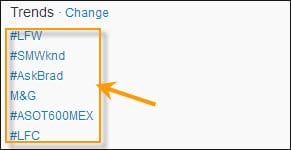
2-trends-with-hashtags

The above screenshot shows one quick way, incidentally, to find out which hashtags are trending right at the moment, while you’re logged in:  By glancing over to your left-hand menu bar and checking the top hashtags that are trending, under the “Trends” window.

You can create your own hashtags.

You can follow other peoples’.

You can follow company or resource hashtags too (e.g. “#Nike”, “#freefood”).

Google+, Pinterest, Pheed, YouTube and Instagram also allow hashtags.  Pinterest and Pheed hashtags in particular, however, are not the same as Twitter hashtags, so make sure you study each network’s specific hashtag guidelines.

8 Benefits of Using Hashtags

You can use hashtags for a variety of functions – and reasons.  We’ve already mentioned narrowing the focus on who to follow, and you can create your own hashtags to serve more than one purpose too.  But before you start using them, you have to be aware of their specific benefits.  Knowing these will affect how you choose to use hashtags.

  • Grow your following and extend your reach
  • Find relevant people, companies and organizations to follow
  • Brand a product or business (e.g. “#Nike”)
  • Brand, promote, manage and track an event through its distinctive hashtag
  • Participate in Tweet Chats and Twitter Parties
  • Quickly tweet information to people (Twitter followers, forum members, subscribers, etc.) who follow your custom hashtag
  • Networking with industry or niche influencers and peers
  • Grow traffic

Creating Your Own Hashtags: 101

Creating your own hashtags is a wonderful way to brand a product, business – or a particular promotion.  (You can use your hashtag as a metrics tool, if you create one for a campaign.)

But it’s like anything else in marketing:  You need to know what not to do, and how to get the maximum effect.

Don’t…

  • Use hashtags containing more than two words (e.g. “#marketingmythsfifteentips”)
  • Create hashtags that are too quirky – unless you have a whole army of promotion tactics to spread it.  (Example:  You want to create a unique identity for an event)
  • Start your tweet with numbers (e.g. “#999”).  You can include numbers – but only after alpha characters (e.g. “#fuzzimals123”)
  • Overuse hashtags.  Keep them for important and highly relevant use.

Do…

  • Make your hashtag short
  • Make your hashtag easy to read (e.g. “freepizza”)
  • Make your hashtag as vividly descriptive – and simple – as possible (e.g. “freepizza”)
  • Remember to use your hashtags to designate topics, subjects or categories

So how do you make a hashtag?  Simply preface any word or word combination with the “#” sign (#MyHashtag) – and share it in a tweet.

You can make your hashtags all lower-case, or use initial caps as above, to help people make visual sense of your combination hashtag.  (“#MyHashtag” is easier to read than “#myhashtag”.)

That’s the easy part.

Making your hashtags go viral is the real trick.

Making Your Hashtags Go Viral

The only way to grow traffic with your hashtags is to make sure they are shared – and more than shared.  You want them to explode on the scene like a spectacular firework and go viral.

We’ve already spoken about the importance of creating hashtags that are short, catchy, easy to read and relevant.  The real trick is to pick the right keyword(s); then pair your new hashtag with a relevant, active hashtag.  For example, if you have created “#FBbloopers”, pairing it with the existing, highly-active hashtag “#socialmedia”.

And, of course, the bigger your list, the more likely your hashtag is to be retweeted and followed.  If you don’t yet have a big list, introducing it on membership sites or forums (if allowed), as well as the above tactic of pairing it with an existing, relevant hashtag should help you get started.

Finding Good Hashtags to Follow

Following the right people via their hashtag can also help boost your own credibility (think  “credibility-by-assocation”), which can net you followers of your own.  You become part of any community built around a strong, evergreen hashtag.  But how do you find them?

In addition to simply searching via the Twitter search bar, there are even more focused ways to find hashtags to follow – especially off Twitter.

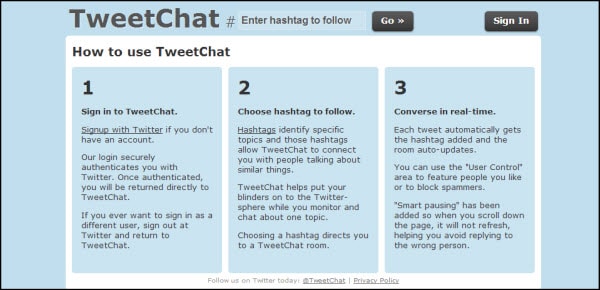
1.    TweetChat – You do have to log in with your Twitter name and password.  What this does is allow to focus on one hashtag, each having its own dedicated chat room.

3-tweetchat

This can save you hours of monitoring tweets you’re not interested in on Twitter by allowing you to focus just on that particular discussion/hashtag.

2.    Twubs – Another strong hashtag directory, which also shows you hashtags and conversations to follow, and allows you to register your hashtags in their directory

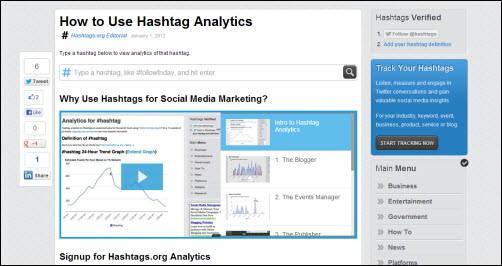
3.    Hashtags.org – allows you to analyze which hashtags are trending, allowing you to “listen, measure and engage”… as well as track!

5-hashtags-dot-org-analytics

There are many more Twitter sites and online management tools.  Pick one that feels a comfortable fits for you.

Hashtag Mistakes

Yes, you can dilute the effectiveness of hashtags – or even do the opposite of what you intended.  For example, if you load each tweet with too many hashtags, people will eventually mentally and literally skim over them without reading.  They’ll feel like “spam”.

So here’s what not to do with your Twitter hashtags, starting with the tip we just mentioned:

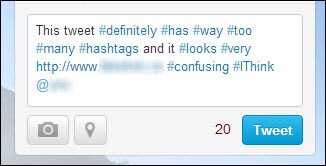
  • Overloading your tweets with multiple hashtags.  It looks and feels aggressively spammy; it’s confusing; it’s hard to read the message you presumably wanted people to read.

4-too-many-hashtags

  • Following hashtags that are not consistent with your brand or stated core values.  Doing so is okay if you are using Twitter as personal recreation – but not if you’re using it for business purposes.

(Example:  Following “#ReallyHateSmallKids” if your business is all about selling quality toys suited for the 3—7-year-old age range to university-educated mothers in a high income bracket.)

  • Inserting popular, trending hashtags not relevant to your tweet content just to ensure your tweet is seen.  The only thing does is annoy the people who are seriously follow that hashtag.
  • Going off topic while using a hashtag.  Don’t get sidetracked into personal discussions that have nothing to do with the hashtag while still using it!
  • Not tracking your hashtags.  Sites such has Hashtags.org often provide easy and thorough tracking tools (free or at paid levels of subscription)
  • Trying to use other special characters in your hashtags.  It’s alphabetical characters only – with numerals allowed in the middle or end.

Don’t overcomplicate things. Focus your hashtag on your goal and your followers.  Make it easy to read and catchy to remember and share.

Now that you know how hashtags work, and what to do/avoid, put them to use.  Make your traffic grow.

Category: Hidden, Social Marketing, Traffic Generation

How to set up twitter

By David Perdew Leave a Comment

Setting Up your Profile on Twitter for Best Results

You’re already on Facebook, and now you’re finally convinced it’s time to join Twitter:  However, these two social networks have their own peculiarities and rules, and you should never judge a network by another one.

By default, everything you post on Twitter is public.  Think of it as a micro-blog, where you are only allowed 140 characters to say everything in one tweet (post).

Just as with Facebook, you have a Profile Photo.  You can set a background on your Profile Page (Twitter offers a few for you to choose from).  You can upload a custom background, if you want to use it to help brand your business with your logo, website colors and graphics.  In fact,  You can do so much more than simply post tweets like this one:

1-sparse-tweet

(Though saying “thank you” is always a good idea.)

But plenty of time for exploring later.  Let’s go through the basics of setting up a strong Twitter profile…

Step 1. Before You Start

Have your Profile Photo ready, and put serious thought into reason for joining Twitter and your Twitter “handle” (username).  Twitter names are always preceded by the “@” sign.  Decide which type of handle will work best for your Twitter goals – your name (e.g. “@johnsmith”) your website’s main offering (“@Mousinator”) or what you want to be known for (“@FBtipqueen”).

In your Twitter handle, you are only allowed to use:

  • Upper and lower case alphabet characters
  • Plain numbers
  • Underscores (“ _ “)

Two important tips:

  • Do keep your handle as short as possible.  The longer it is, the less characters people will have when replying to you, as they have to include your handle in their reply.
  • Keep in mind your handle is also a keyword. That’s why you might want to include your best keyword in your handle, if you want to be found that way

Choosing Your Profile Photo – You can rarely go wrong with using an updated headshot, but you may wish to use your logo instead.  If you want to brand your company and eventually sell it, use your logo.  The Profile Photo size specification is 700k maximum.

It all depends on your goal and objective in using Twitter – but no matter what your main goal, you will want to set up Twitter optimized for growing your traffic!

Adding Contacts – Also consider ahead of time how you are going to add connections you already have.  Just like Facebook, Twitter will ask to use your address books and email accounts.  You can also add them manually.

So you’ve decided on your objective, handle and profile photo.  Time to sign up and set up!

Step 2. Signing Up

Signing up is a really easy process…

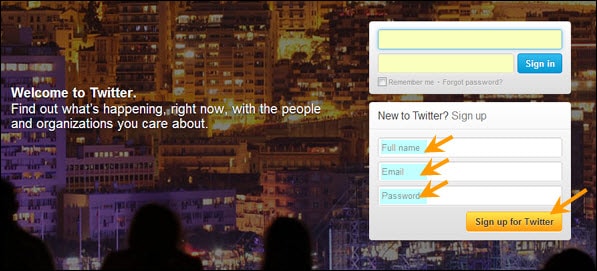
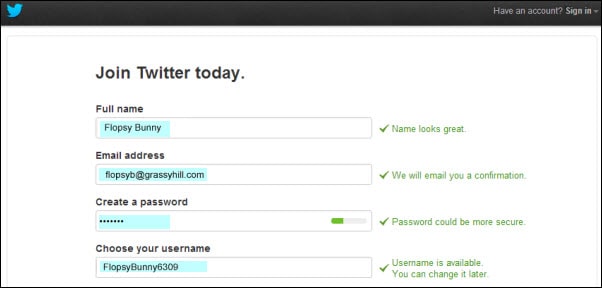
1) Go to Twitter’s https://www.twitter.com/ page.  Fill in:

  • your full name
  • the email address you want Twitter notifications to land in
  • A strong password, containing Upper and Lower case letters, numbers and at least one special symbol  (e.g. “Wsb33*a1”).

2-welcome-page

2) As new page will open.  Fill in your data.

3-enter-data

Notice that Twitter will automatically fill in the username choice it thinks best.  If your actual name is taken, you will most likely see your name (or an abbreviation of it) and a bunch of numbers.

Remember, keep it short and memorable.  Replace this suggestion with a better optimized handle.  (Example: “@ FlopsyB” or “@CarrotQueen”, if the latter is your website name; or the name of a book you’ve written; or what you want to be known as.)

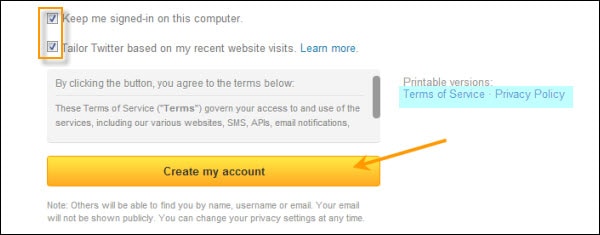
3.    Scrolling down further, uncheck “Tailor Twitter based on my recent website visits”, if you share your computer with others in the house or office.

4-terms

Be sure to save a record of your username and password, as well as read the “Terms of Service” and “Privacy Policy”, before clicking “Create my account”

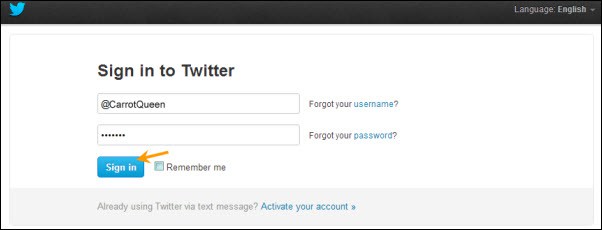
4.    Log in.

5-log-in

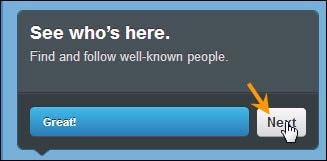
5.    You’ll see a welcome message, using your real name.  Select “Next”.

6-next

6.    It will then walk you through a series of set up steps, first suggesting you pick 5 people to follow from a list in a left-hand, vertical widget.

At first, you will see nothing but celebrities.  Keep scrolling down, until you begin seeing authority sites and news sites like CNN; or social networks you really want to follow, such as YouTube.  (Yes, it has its own Twitter channel!)

7-follow-suggestions

As you add more accounts from this list, you’ll notice you’re being served better-tailored results.  Twitter is “reading” your choices and adjusting to accommodate your tastes.

Don’t go overboard:  Make sure you only choose people who are relevant to your Twitter goal and intended audience.  Also, be aware Twitter is actually going to force you to follow five more.  (Don’t worry, you can Unfollow them as soon as you’ve finished setting up your profile.)

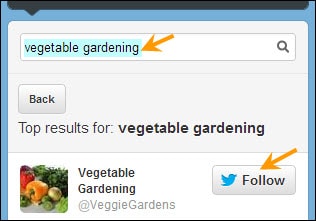
7.    You can also search Suggestions with your keywords.

8-suggestions-search

8.    Select your compulsory “5 more”, and press “Next”.

9-next


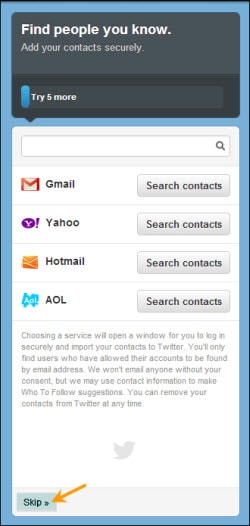
9.    Now you’ll be allowed to select email addresses for Twitter to mine.  If you don’t wish to enter email contacts at this time, simply press “Skip” in the bottom-left corner of the widget.

10-add-email

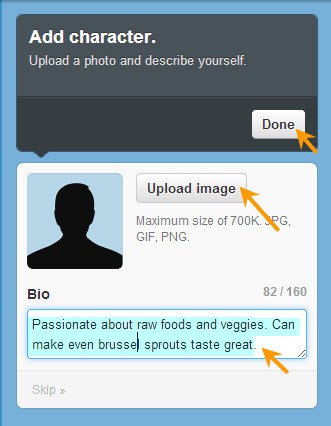
10.  Twitter now invites you to “Add Character”.  Write your 160 word bio in the textarea box – don’t worry; it will tell you how many characters you are using as your type.  Then upload your chosen Profile Photo.

11-add-character

11.  At this point, you’ll be told you were sent an email notification. You can either choose to confirm your email now and log in again:  Or continue.

You will also get your first glimpse of how your Twitter account and feed looks.  If you find one of the accounts you added has completely dominated your feed, Unfollow them.

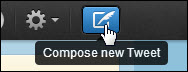
12.  Go to the top-right corner.  Click on the little quill pen icon.  This will allow you to compose your first tweet.

12-first-tweet

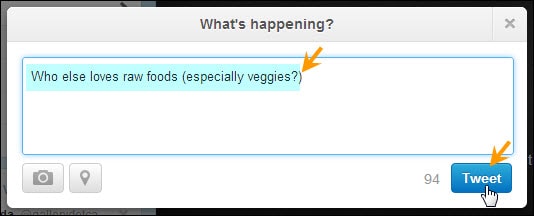
A textarea box will open up.  Type away!  Introduce yourself, or ask a question.  (Don’t expect too much interaction yet.)

13-tweet

You can also click on “Home”; then enter your tweet in the textarea box in the left-hand vertical widget.

Use the little camera icon to add a photo, and the magnifying glass to add your geographical location.

Tips to Grow Your Traffic

After you have added all the targeted contacts you care to at the moment, spend some time listening to their conversations.  Get the feel of these; then add your own tweets on the same topic.  When you Follow people on Twitter, many will follow you back.  They will see your tweets – especially if you use hashtags they use in your comment.  (But only use a hashtag if it’s relevant to what you’re saying.)

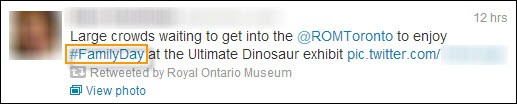
A hashtag looks like this:  “#hashtag”.  It’s used like a keyword, and people will search for ones that interest them.

Notice that this tweet was Retweeted by the Royal Ontario Museum.  Start retweeting posts that please you.  Thank people when they retweet yours.  Reply to comments.

1.    To take any of these actions, hover your mouse over the bottom of the tweet to make action links appear.  To retweet, click “Retweet”.  To reply, click on “Reply”.

14-hashtag

Twitter will automatically dump the handle of the person you are replying to into your textarea box.  Simply fill in the rest of your tweet.

13-tweet

Mix your posts. Don’t just write your thoughts — tweet:

  • Links to great articles you like or blog posts you’ve written
  • Photos
  • Questions
  • Links to polls you’ve created
  • Comments about your life your audience can relate to
  • Breaking news for your niche or industry
  • Tips

In short, anything you think will interest your audience and start a conversation.

Adding the Extras

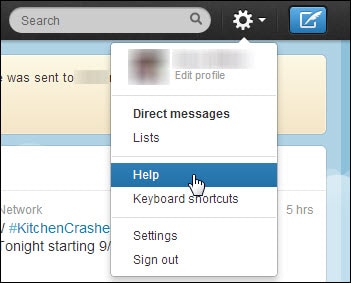
The most important thing is to get your Twitter profile up and running.  But don’t just leave it there – study the Help Section and it’s 31 Twitter Basics, to find out strategies, tweaks and techniques to make your Profile even more attractive to your target audience.

17-find-help

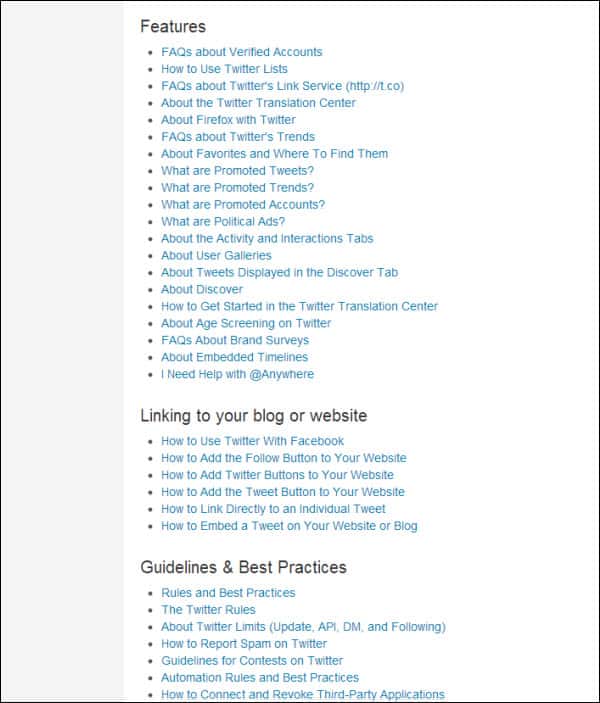
The Help section will allow you to learn all sorts of ways to optimize your Profile and Twitter account even more – including:

  • Customizing your page colors and design
  • How to be found by your phone number
  • Going mobile

And much, much more.

18-contents

But no matter what you decide to do – or not do – to your Twitter Profile, always keep one thing in mind with every change or tweak.

It should appeal to and align with your target market… while growing you more traffic!

Category: Hidden, Social Marketing

MyNAMS 30-Day List Building Challenge Blog Tour Schedule

By David Perdew Leave a Comment

The MyNAMS 30-Day List Building Challenge Blog Tour Schedule

Whew, 30 days of writing in-depth meaningful posts about important topics.

Yikes! I've committed to this. My partners are expecting it and I'm really on the line here. Here's the schedule for the blog tour. It will be updated frequently over the next couple of days as we fill in the blanks.

[30blogschedule]

Why the MyNAMS Insiders Club is EXACTLY
what you're looking for!

MyNAMS Team

MyNAMS TEAM - You never have to work in isolation again!

The MyNAMS Team goes way beyond the staff and support personnel. We've put together a group of people who make it their mission to ensure your success. With more than 75 instructors and 100s of members, you find people who can answer your questions quickly, partner with you to create products, and build relationships that help you launch your business or take it to the next level.

We've worked diligently to ensure you have the ability to communicate with us, instructors, and peers (at your own experience level) in a safe environment and find the right mentors or coaches just for you. We make the introductions that you want.

Look for the icon at the left in the benefits grid to see the specific team options we offer. 

icontraining200

MyNAMS Training - Learn what you need when you need to learn it!

The MyNAMS Training system is focused on thorough step-by-step instruction with that meets you where you are. It makes no sense to teach you advanced strategies and techniques when you don't have a blog or website. And teaching you how to install a blog when you have dozens already is ridiculous. First, we determine where you are in your experience and then we point you to the right level of training that will enhance your business experience from Novice to Advanced.

Yes! We teach marketing, traffic generation, technology, keyword research and much more, but only when you're ready. And if you need help just getting the technical aspects of doing business online, we have more than 1300 tutorial videos in the Library.

Look for the icon at the left in the benefits grid to see the specific training options we offer.

icontools200

MyNAMS Tools - Content, graphics, audio, checklists - we've got it for you!

The MyNAMS Tool belt comes with just about everything you need to get a business up and running. In fact, you can be selling products from the Niche Mall even if you've never sold anything before and don't have a website. One of the most frustrating parts about doing business online is realizing you have to nickel and dime yourself to bankrupcy before you can actually get a site up. Not with us.

We provide you graphics, article content, images, audio clips, reports, sales funnels, turnkey websites, and even adsense website portals so you can begin immediately to create or improve your business with confidence that you don't have to spend a ton more cash.

Look for the icon at the left in the benefits grid to see the specific tools options we offer.

To find out more about the MyNAMS Insiders Club, click the link below!

Continue to Custom Content Wizard here

Category: Featured Content, List Building

30 Day Listbuilding Challenge

By David Perdew Leave a Comment

Are you scratching your head 
trying to figure out why you can't make money online? 

No List? No Money? No Business! We Share A Step-By-Step Blueprint To Building A Profitable,
Responsive And Dedicated Community Of Admirers

Yup I said it. I'm throwing down the gauntlet. I'm putting it all out there. My Goal: Increase
my list by 1000% in the next 30 days and double my recurring revenue
in the same time frame? Do you want some of this action?

From: David Perdew
RE: Get off the couch and build your profitable list!

No matter how awesome your blog or website is, it can look like a lonely planet. No visitors. No buyers. No sales. Nada.

Indeed, you need traffic. The goal? To build a responsive mailing list…

And then, to make money!

With a list, you have the power to do great things:

  • Build people’s awareness of you, your products and/or services
  • Connect with customers and potential buyers on a deeper and more personal level
  • Discover what your target market really wants and needs and give it to them
  • Keep people engaged with various forms of content
  • Build a tribe or community of people who trusts you
  • Get people to act on your suggestions and offers
  • Plus so much more.

What does that mean to you?

When you have a list, you have the opportunity to make it responsive.

You have people coming back to your site and buying from you.

That's when the money pours in!

For so many people, list building is a goal… and, yes, a dream.

But to most, it remains just that. A dream. Never a reality for reasons like…

  • I don’t know how to build a list
  • Busy, busy, busy
  • No idea how to set up an opt-in form
  • It’s hard to get traffic
  • I don’t know HOW to start

Well, here's the truth. Seeds don't grow in a day. There's a learning curve to list building.

Don't worry. It doesn't have to be a painful experience. It can be super fun and exciting.

The MyNAMS 30-Day List Building Challenge

What is this challenge all about?    

It's a practical hands-on 30-day program designed to build a responsive mailing list;

I am David Perdew, CEO and Founder of MyNAMS.com, and I have built a list of thousands. Now I'm accepting a challenge to grow my list by 1000%. I will take you by the hand and shows you how while I throw back the curtain to reveal every action I take. 

You'll see exactly how I do it and apply these same concepts to your business. REAL TIME.

Clearly, it's a great challenge - its going to be hard work and big fun but worth it, for sure!

If you're any one of these types of people:

  • first timers or those with a zero list
  • those with a few subscribers in their list and want to expand it
  • someone with a list that has reached a certain level and seemed to stall
  • people who have a huge but unresponsive list

This challenge is for you!

What's the plan?

The Challenge Starts on May 22nd with 5 days of planning and then we jump into the 30 days of list building.

"Wait, I'm confused already!"

So, planning and fixin' to as we say in the South doesn't count in my book. If we're going to do 30 days of list building, lets focus on that and not the set up or creating funnels. That's a given. BUT it's work that needs to be done. We give ourselves (and you) five days to get the infrastructure set up.

Don't worry, we'll be right there with you to help.

After that 5 day setup is completed, THEN we start the 30-Day countdown with a bang!

As soon as you join, your first task is available for you. A 4-hour long Workshop with special guests Jayson Benoit and Kelly McCausey who give you advice, tips and their best list building strategies, tools and resources. You will also learn how to set up an opt-in form on your site if you don't have one already.

You want to watch this ASAP so you are ready to go!

What exactly is included in this challenge?

We will add bonus content through out the challenge. Especially when we find a tool or resource that we find helpful.

[30day List Building]

If you are  serious making profitable list building your business's #1  priority for the next 30 days - and the rest of your business career - sign up now.BigBuyItNowButton$67


At the end of this challenge, the price on this package goes up to $697! We want you in now to take advantage of the
list building opportunity while we build the challenge.

What do you get?

At the end of this 30-day challenge you will have:

  • a better sense of why list building is vital to your business success
  • foundational knowledge and skills on how to build a list, how to sustain it and how to profit from it
  • a basic understanding of how to interpret and read your number- no math means no money
  • a replicable list building blueprint
  • a functional kit of simple and easy-to-use list building tools
  • healthy amount of traffic to your website or blog
  • a list building experience (and habit) that can never be taken away from you
  • confidence that you can do it again and again in whatever niche you choose
  • and more importantly, a responsive and profitable list

 If you're waiting for that perfect moment, it was yesterday.
The next perfect moment is now.

 Opportunities come and go BUT this is one opportunity that you don't want to miss…unless
you want to be exactly where you are now:

  • without a list
  • with a few lethargic subscribers in your list
  • with a huge but unresponsive list

You choose. It’s an easy choice but you have to make it now!

money-back-logo
IRON-CLAD, BULLETPROOF GUARANTEE

How Can We Offer A 100% No-Questions Asked, Money-Back Guarantee?

You've made a great decision! Now, it's time for us to live up to our end of the bargain. And we always do, no matter what the issue is.

Our reputation is the most important thing we have at NAMS. We've helped hundreds of students create new businesses or improve existing ones.

Still, we want to make this even easier for you!

Our fool-proof guarantee says that you will have 30 days to decide whether this is for you.

And frankly, it's not right for everyone. Only those who are serious about taking control of their lives and their businesses need apply! But if that's you, jump and we'll assume all the risk. If you change your mind for any reason within 30 days of purchase, we'll happily refund your money.

You have nothing to lose! There's no risk to you. Try it and love it. If not, you can get your money back easily, quickly and safely with our fool-proof guarantee!

David Perdew
NAMS CEO

Why the MyNAMS Insiders Club is EXACTLY
what you're looking for!

MyNAMS Team

MyNAMS TEAM - You never have to work in isolation again!

The MyNAMS Team goes way beyond the staff and support personnel. We've put together a group of people who make it their mission to ensure your success. With more than 75 instructors and 100s of members, you find people who can answer your questions quickly, partner with you to create products, and build relationships that help you launch your business or take it to the next level.

We've worked diligently to ensure you have the ability to communicate with us, instructors, and peers (at your own experience level) in a safe environment and find the right mentors or coaches just for you. We make the introductions that you want.

Look for the icon at the left in the benefits grid to see the specific team options we offer. 

icontraining200

MyNAMS Training - Learn what you need when you need to learn it!

The MyNAMS Training system is focused on thorough step-by-step instruction with that meets you where you are. It makes no sense to teach you advanced strategies and techniques when you don't have a blog or website. And teaching you how to install a blog when you have dozens already is ridiculous. First, we determine where you are in your experience and then we point you to the right level of training that will enhance your business experience from Novice to Advanced.

Yes! We teach marketing, traffic generation, technology, keyword research and much more, but only when you're ready. And if you need help just getting the technical aspects of doing business online, we have more than 1300 tutorial videos in the Library.

Look for the icon at the left in the benefits grid to see the specific training options we offer.

icontools200

MyNAMS Tools - Content, graphics, audio, checklists - we've got it for you!

The MyNAMS Tool belt comes with just about everything you need to get a business up and running. In fact, you can be selling products from the Niche Mall even if you've never sold anything before and don't have a website. One of the most frustrating parts about doing business online is realizing you have to nickel and dime yourself to bankrupcy before you can actually get a site up. Not with us.

We provide you graphics, article content, images, audio clips, reports, sales funnels, turnkey websites, and even adsense website portals so you can begin immediately to create or improve your business with confidence that you don't have to spend a ton more cash.

Look for the icon at the left in the benefits grid to see the specific tools options we offer.

To find out more about the MyNAMS Insiders Club, click the link below!

Continue to Custom Content Wizard here

Category: Featured Content, Hidden, List Building

  • Previous
  • 1
  • …
  • 29
  • 30
  • 31
  • 32
  • 33
  • …
  • 59
  • Next
  • Help Desk
  • Contact
  • Support
  • Privacy Policy
  • Earnings Disclaimer
  • Legal Notices
  • Membership Agreement
  • TOS
  • Testimonials
  • Affiliate Disclosure

Copyright © 2025 · MyNAMS.com · All rights reserved
NAMS, Inc. 203 CR 890, Etowah, TN 37331 USA

Disclosure: Some links on this website may be affiliate links. If you make a purchase through one of our affiliate links, we may earn a commission.
We only endorse products and services we use or trust.