Novice to Advanced Marketing System

NAMS | Building an Online Business to Support Your Dreams

  • Home
  • Affiliates
  • Support
  • Blog
  • Masterminds
    • NAMS 90 Mastermind
    • Affiliate Sales Dominators Mastermind
    • Idea To Income Mastermind

Archives for 2011

Utility Poster Eliminates Blogger’s Block

By David Perdew Leave a Comment

Did you know that Utility Poster stops writer’s block – or I guess, more appropriately, blogger’s block dead in it’s tracks?

Do you occasionally stare at that blank screen wondering what to feed the content monster today? It just sits there staring at you demanding to be fed, but you have nothing profound to say.

What if you could just provide a very fast roundup of keyword-targeted news that helped you delivered lots of content to your readers in a very short time?

And what if that news roundup helped you rank for hundreds of keywords and get you a ton of trackbacks?

Jack Humphrey, one of the foremost experts in blogging and blog marketing for high search rankings, has released a new app he uses to rank for over 6400 keywords in Google!

(That’s not a typo!  He ranks for more keywords than that, but he gets targeted traffic from just over 6400 keywords a month!)utility-poster-eliminates-bloggers-block
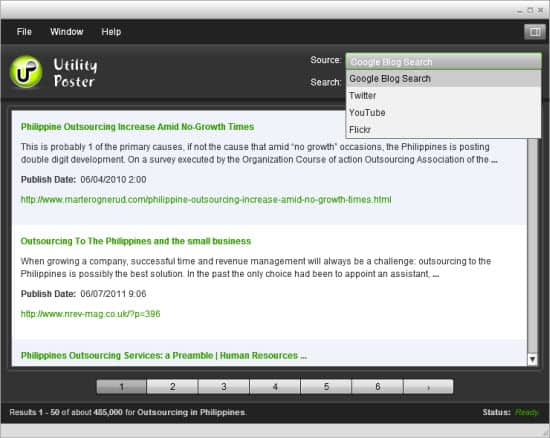
Utility Poster
The simple Utility Poster software interface – all in one screen

The reason he created the application was to give you a way to keep your blog active with high-quality, search friendly content and to get you trackback links.

Thank God he did because it’s one of my favorite tools for creating weekly round ups on some of my blogs. And it’s so simple, even I can do it in about 5 minutes. I know. I’ve been using it for a few months to check it out.

Those links help you get higher rankings for your blog posts by simply using a nearly-automated tool to create posts.

Its called “Utility Poster” and it is simply incredible software.

If you visit there now, fine, but be sure to read all of this to learn how to get an additional $20 discount.

  • It works on PC and MAC – or anything else you can throw at it because it’s an Adobe AIR application
  • It combines Utility Poster and his other two very popular programs: Video Utility Poster and Trackboost

So, here’s the key

You choose the topic by inputting your favorite keyword, choose the type of content by choosing the search category, and click Search. Voila – you’ve got a ton of possibilities for your news roundup.

Post relevant, keyword-rich, high-quality content in the form of snippets  from other blogs, videos from YouTube, Twitter tweets, and Flickr images – all based on whatever keyword you  search with.

You choose from the best conversations going on around the web in your target market and efficiently hand-pick what you include in your posts.

The results:

  1. You own an active, engaging, relevant, and search friendly blog as if you were writing 100% original content.
  2. You build links back to your site through trackbacks.
  3. You build content readers WANT to experience rather than bland, spammy SEO articles that only satisfy the search engines but build no loyal following among readers.

Big tip on how to use Utility Poster for joint venture listbuilding

One of the favorite list building leverage techniques covered in our affiliate training here is to create “Top Lists” of category items such as “Top 20 SEO Techniques“.

But how do you find those techniques? And how do you find people to participate in the promotion?

Do a blog search using Utility Poster, put together the piece by dragging the 20 blog post snippets with links into your new post window (just as Jack shows in the demo video), contact the 20 bloggers and encourage them to promote the roundup article naming THEM as a top 20 technique.

Who wouldn’t want to promote your blog post if they were recognized as an expert in the post? And you’ve just put this together in about 10 minutes…choosing only the most targeted and effective posts to reference.

Other bloggers will willingly and happily link to you as if you wrote the whole thing from scratch.

And you can do in minutes what would normally take you hours to do for such quality posts!

The best way to experience the power of Utility Poster 3.0 is to watch Jack’s complete walk-through video here.

Utility Poster is going to take your blog to new heights in the search engines while cutting your blogging time to a fraction of what you spend now.

Never be afraid of the blank screen again. Now, you can post great content whether it’s video or blog posts or pictures with Utility Poster.

A secondary benefit of using this tool is one that Jack never addresses: Research!

This little tool allows you to quickly research a topic to gather some of the best info on the web already. You can use that information (and some images from Flickr) to create your own original material.

Don’t overlook this – because nothing triggers original writing like reading through and rewriting other people’s material and adding your own twist.

Utility Poster dominates in this department.

So, what’s wrong with Utility Poster:

If Jack Humphrey was sitting in front of me and ask me what I didn’t like about the program, I’d mention two things:

  1. The sort order of the blog posts can be a little random sometimes, especially in the date field. While I want my posts to be the latest, I’d like to be able to choose whether they should be in chronological order or relevance order as it already is with the Youtube search options.
  2. I’d like to see a Google search or even a Google News search option in addition to the Google Blog Search.

But that’s it.

Now, to purchase this cool tool, Jack has it priced it to sell at $67 on the sales page, but here’s a tip:

Leave the page, and you’ll get a second chance to buy it at just $47.

It will be one of the best $47 you’ll ever spend. (Don’t tell him I told you about this tip. I paid full-freight for Utility Poster!)


Category: Business Operations, Tools I love

Facebook's Open Graph Protocol – How to Facebook For Business With Powerful Leverage

By David Perdew Leave a Comment

As a blogger, the question is how to Facebook for business and pleasure effectively

Here’s a stat that will blow your mind…

According to AllFacebook.com, 1 of every 8 minutes users spend online is on Facebook.

Want another staggering stat from From Tech Journal South?how to facebook for business

More than 25% of all page views on the web are now on Facebook. (Facebook) accounted for 24.27 percent of all U.S. pageviews, while runner-up YouTube.com had 6.93 percent.

Wow!

That is domination. Wouldn’t it be great to tap into that traffic with your blog automatically?

Welcome to Facebook’s Open Graph protocol technology – the ultimate vehicle in changing how to Facebook for business and personal use.

I’d never hear of the protocol until today. And now, I’m really excited about harnessing the power of Facebook from my own blog.

So, what is Open Graph?

Well, it gets very technical. And frankly, I just passed over the techie part. I don’t really care. What I do care about are the benefits. But before we get into that, let’s review what the “Like” button does and why it’s cropping up all over the web on different sites. (You’ll notice I’ve added it to this blog as well as the member forums and member blogs.)

This concise description comes from Facebook’s own Core Concepts / Social Plugins / Like Button page:

“The Like button lets a user share your content with friends on Facebook. When the user clicks the Like button on your site, a story appears in the user’s friends’ News Feed with a link back to your website.”

Okay – that’s pretty cool. Clicking a like button puts that content right into Facebook’s content flow. We knew that…

But…

“When your Web page represents a real-world entity, things like movies, sports teams, celebrities, and restaurants, use the Open Graph protocol to specify information about the entity. If you include Open Graph tags on your Web page, your page becomes equivalent to a Facebook page. This means when a user clicks a Like button on your page, a connection is made between your page and the user. Your page will appear in the “Likes and Interests” section of the user’s profile, and you have the ability to publish updates to the user. Your page will show up in same places that Facebook pages show up around the site (e.g. search), and you can target ads to people who like your content.”

Did you catch that?

“…you have the ability to publish updates to the user…and you can target ads to people who like your content.”

If you use Open Graph and turbo-charge your “Like” button on your posts, you can connect automatically with anyone who “Likes” your content – whether it’s the page or the post – as if they were liking your Facebook Fan Page because  Facebook now treats your pages with the Open Graph Protocol installed as if they were Facebook objects.

The downside is that, like everything else Facebook does, it’s pretty tech heavy and not all that user friendly. Until now, understanding the Open Graph protocol was a little daunting.

No more mystery determining how to Facebook for business – let your readers do it for you…

A new friend of mine on the Warrior Forum (Peter Maxwell)  created a plugin that makes the whole process simple and automatic. There’s no question now how to Facebook for business more effectively – or for more exposure if you’re promoting your personal writing.

This is exponential leverage, and it finally solves the puzzle of how to Facebook for business easily

And not a lot of people know about this yet. Peter just released his plugin yesterday.

He’s combined the Open Graph protocol with the “Like” button and a Facebook comments on WordPress in one plugin.

I installed it in a few minutes, tested it, and just can’t live without it now.

The hardest part is setting up a Facebook app to connect directly to your blog, but Peter’s installation guide walks you through that.

So, how much is this magical little baby. It may be the best deal on the web right now. A single license for all your personal blogs – just $17.

And if you’re building blogs for clients, get a developers license for $47.

I’m not kidding. Peter says this may be the most important plugin he’s created and I agree. This changes the way I do everything on my blog.

Be sure to check out this plugin today before the price goes up and discover how to Facebook for business or pleasure and get more access from your readers.

Category: Social Marketing, Tools I love, Traffic Generation

Are you ready to have your own radio show with Blog Talk Radio?

By David Perdew 1 Comment

Mastering Blog Talk Radio is so much easier than I thought it would be

http://www.youtube.com/watch?v=zZb7n2590BQ

Joe Marsh and Cindi Dawson revealed their Blog Talk Radio secrets in a special webinar.

In a another life long, long ago, I ran from a radio station recording booth where I had been trying to tape a commercial for the newspaper I owned then.

When I heard my voice on the playback, I freaked out.

The thought of hearing myself hawking my papers on car or home radios was too much for me at the time. My self-confidence was so low, that I afraid of embarrassing myself in front of thousands of listeners in my hometown, many of them that I knew personally.

So I decided never to try radio again.

That was 30 years ago. Since then, I have been a talk show guest on major metro television programs as a local expert on some aspects of the news business. In the past year and a half I’ve hosted nearly 100 webinars. And I regularly speak in front of large crowds. But until today, I still was nervous about using radio. And the idea of my own radio show still freaked me out a bit.

blog talk radio

Like many others, I had established a Blog Talk Radio station a couple of years ago and had actually produced a few programs, but BTR was too complicated and too inefficient for my taste. (And it still felt too much like radio.)

When Blog Talk Radio changed their business model to a paid model with a nearly-invisible free option, I wasn’t willing to spend the money if I didn’t know how to use the program effectively.

Boy, was I wrong about Blog Talk Radio!

Joe and Cindi spent an hour demonstrating how BTR – the free version – can be an important part of your marketing arsenal generating great traffic to you products and services.

Blog Talk Radio, they said, can be used for content creation to create articles, reports and even blog content material. They also emphasized how BTR can help you get more exposure for your current or new businesses by taking advantage of one of the key benefits: Getting ranked in the search engines quickly.

Of course, free organic search engine traffic puts more dollars in your pocket as well as your clients if you service clients.

But isn’t producing a live radio show a pain? Not if you do it the way Joe and Cindi show you.

In fact, it doesn’t have to be live at all. You can upload pre-recorded shows to take advantage of BTR’s exposure. Of course, you can host your shows live too to interact with your audience.

Speaking of free, Joe and Cindi smashed my concern about having to spend money at Blog Talk Radio to get the most benefits from the service.

You don’t need a paid blog talk radio account to get started.

With BTR you can create radio programs, series, audios magazines, e-books, reports, articles, CDs and DVDs, as well as physical books and Kindle books.

Be sure to watch the replay of the BTR webinar. It’s great stuff.

But be sure to sign up for their four-part webinar series before June 6 to discover how to really master Blog Talk Radio. Joe and Cindy will reveal in depth how to use blog talk radio most effectively to drive massive traffic to your business and while creating massive products on the fly.

Because you’re a friend of mine, I was able to secure this special deal on the 4-part Mastering Blog Talk Webinar series for you.

The low price is guaranteed until June 6, then all bets are off. The price will go up substantially..

Check out Mastering Blog Talk Radio now.

Category: Tools I love, Traffic Generation

Welcome to the 6 Steps to Implementing Big Ideas – Part 0

By David Perdew 4 Comments

Welcome to the 6 Steps to Implementing Big Ideas – Part 0

Since I was a kid, I fancied myself as a writer.  I loved writing. And baseball of course.

So became a journalist working in the newspaper business for nearly 20 years as a reporter, photographer, editor and publisher..

…in the opposite order actually. After graduating from journalism school nearly 35 years ago with a wife and 2 kids, I couldn’t afford to take a entry level reporting job.

News-Republican-Crew-1978
That’s my newspaper crew in 1978 – I’m the one in the middle with dark hair

I bought a newspaper and became the publisher. That’s me on the right in 1978 leading my team.

I had no idea what I was doing, but it seemed like one of my great big ideas

And besides, it made me a big man in hometown at just 26 years old (I’d been in the Air Force for 4 years prior to school which was why I had the wife and two kids at that tender age…)

Well, in my 6 Steps to Implementing Big Ideas, that would have been called the Dream / Execute 2-step and sure way to fail fast and spectacularly.

If you remember, the six steps to implementing big ideas are:

  • Dream
  • Prototype
  • Test
  • Execute
  • Feedback
  • Improve

I didn’t prototype or test my idea.

So I invested all my money up front on a whim. Even gamblers at the roulette table know better than to lay all your money down at once.

The newspaper was a huge success.

We increased the subscriptions by 130 percent in 9 months. And we won tons of state and national awards. I was on the map as a crusading journalist. And I began getting lots of career opportunities and attention. It seemed like this was one of those big ideas that might just pay off.

The newspaper was a disastrous failure.

Unfortunately, in that same period my expenses tripled (tripling your subscriptions cost a lot of money that advertisers must make up). My advertising revenue was limited by the per thousand price I could charge and still be competitive with the local daily with 10 times my circulation.

There are many hints to why this failed (and I lost all my money and then some) in that 9 months.

  1. Defining processes for growth never entered my mind. That’s what we call prototyping by the way. I just assumed all growth is good. My ego said we should be the paper of record in that town. And get as big as possible as fast as possible. The most profitable that paper was ever going to be was at the beginning circulation when I purchased it.
  2. I hadn’t tested the growth – One question is all I had to ask: What happens if we triple circulation? All I had to do was run a spreadsheet to discover that answer, but noooo….I was too busy executing to test.
  3. Advertisers didn’t care that we were winning journalistic awards. They wanted us to deliver more leads to their businesses for less money than the competition, not more. But I didn’t ask for their feedback...until it was too late. So, as the circulation went up and our advertising prices increased to cover expenses, our advertisers fled. In the newspaper business, advertising makes everything else possible. Newspaper subscription prices make only a small dent in the revenue flow.
  4. I ignored the competition because we were a “better” newspaper. The market was giving me great feedback and I ignored that to. And we when collapsed under debt, that ugly little daily was just cranking along.

The 6 Step process to implementing big ideas that we’re following here would have ensured my publishing success.

But I didn’t know about the process.

You will after you take this eCourse.

If you haven’t yet signed up for this free eCourse, do it now while it’s free. We’ll cover each of the six steps in much more detail.

Next, we’ll dig into the first of the 6 steps:

Dream – or the Big Idea.

Let’s hear what you think of this so far! Put your comments in the box below and tell me what your big ideas is.

Category: Business Operations, General, Motivation

How to get started in online business…

By David Perdew Leave a Comment

Getting started can be the biggest issue, especially for beginners in online marketing.

What should I do first? When do I make money? How will I get traffic?

So many questions, so many tools, so much confusion!

I did a webinar today that I hope will help you begin from the beginning. Add your comments and questios below after you watch it. I’d love to hear from you.


Category: Business Operations, General

  • Previous
  • 1
  • …
  • 6
  • 7
  • 8
  • 9
  • Next
dd-sidebar-ddvertical-1

Sign In >

Popular Posts

NAMS Funnel Revealed
Discover the 3 Sales Funnel Stages that Everyone Must Use to Become Profitable Fast!
Your YouTube Marketing Strategy with 5 Easy Tips
How to Increase Traffic Through Social Media
Use Pinterest as a Marketing Tool: 9 Ways to get More Traffic and Sales

About NAMS

The Novice to Advanced Marketing System is a step-by-step system focusing on Team, Training and Tools to help novice to advanced business people build a Simple, Scalable and Sustainable business.

Other Related Content

5 Affiliate Marketing Strategies that Convert Like Crazy

5 Myths of Affiliate Marketing | Affiliate Marketing For Beginners

5 of the Best Affiliate Marketing Tips

5 Passive Income Business Ideas

Affiliate Marketing Roundup – 02/13/2011

  • Help Desk
  • Contact
  • Support
  • Privacy Policy
  • Earnings Disclaimer
  • Legal Notices
  • Membership Agreement
  • TOS
  • Testimonials
  • Affiliate Disclosure

Copyright © 2026 · MyNAMS.com · All rights reserved
NAMS, Inc. 203 CR 890, Etowah, TN 37331 USA

Disclosure: Some links on this website may be affiliate links. If you make a purchase through one of our affiliate links, we may earn a commission.
We only endorse products and services we use or trust.