Novice to Advanced Marketing System

NAMS | Building an Online Business to Support Your Dreams

  • Home
  • Product Catalog
  • Free Resources
  • Affiliates
  • Support
  • Blog
  • Masterminds
    • NAMS 90 Mastermind
    • Affiliate Sales Dominators Mastermind
    • Idea To Income Mastermind

NAMS10 Video Replay 100 Level

By Jen Perdew Leave a Comment

NAMS 10 Video Replays 100 Level


Friday NAMS 100 Sessions

The hotel has some serious internet issues on Friday that were beyond our control. We offered these same exact sessions at NAMS9. While we work though the recordings from Friday at NAMS10, I've put the NAMS9 replays here instead to ensure you get the full training.

Chris Cobb, Paul Taubman, Regina Smola- Starting from Scratch


Paul Taubman: WordPress Implementation- I have WordPress Installed... Now What??!! Part 1


Paul Taubman: WordPress Implementation- I have WordPress Installed... Now What??!! Part 2


Saturday NAMS 100 Sessions

Joyce Jagger: I Have a Site. What's Next?


Karon Thackston: Creating Your First Landing Page: How to Build Trust, Traffic and Sales


Lou Bortone: Easy Video Techniques


Sunday NAMS 100 Sessions

Kelly McCausey- Simple Ways to Drive Traffic to Your New Website


Mary Jo Wagner: Surviving Conference Overwhelm- How to Implement What You Have Learned
You will want to Download this Handout Here to Follow Along With


Why the MyNAMS Insiders Club is EXACTLY
what you're looking for!

MyNAMS Team

MyNAMS TEAM - You never have to work in isolation again!

The MyNAMS Team goes way beyond the staff and support personnel. We've put together a group of people who make it their mission to ensure your success. With more than 75 instructors and 100s of members, you find people who can answer your questions quickly, partner with you to create products, and build relationships that help you launch your business or take it to the next level.

We've worked diligently to ensure you have the ability to communicate with us, instructors, and peers (at your own experience level) in a safe environment and find the right mentors or coaches just for you. We make the introductions that you want.

Look for the icon at the left in the benefits grid to see the specific team options we offer. 

icontraining200

MyNAMS Training - Learn what you need when you need to learn it!

The MyNAMS Training system is focused on thorough step-by-step instruction with that meets you where you are. It makes no sense to teach you advanced strategies and techniques when you don't have a blog or website. And teaching you how to install a blog when you have dozens already is ridiculous. First, we determine where you are in your experience and then we point you to the right level of training that will enhance your business experience from Novice to Advanced.

Yes! We teach marketing, traffic generation, technology, keyword research and much more, but only when you're ready. And if you need help just getting the technical aspects of doing business online, we have more than 1300 tutorial videos in the Library.

Look for the icon at the left in the benefits grid to see the specific training options we offer.

icontools200

MyNAMS Tools - Content, graphics, audio, checklists - we've got it for you!

The MyNAMS Tool belt comes with just about everything you need to get a business up and running. In fact, you can be selling products from the Niche Mall even if you've never sold anything before and don't have a website. One of the most frustrating parts about doing business online is realizing you have to nickel and dime yourself to bankrupcy before you can actually get a site up. Not with us.

We provide you graphics, article content, images, audio clips, reports, sales funnels, turnkey websites, and even adsense website portals so you can begin immediately to create or improve your business with confidence that you don't have to spend a ton more cash.

Look for the icon at the left in the benefits grid to see the specific tools options we offer.

To find out more about the MyNAMS Insiders Club, click the link below!

Continue to Custom Content Wizard here

Category: Content Creation, Featured Content, Traffic Generation

NAMS 10 Thursday and Monday Add On Workshops

By Jen Perdew Leave a Comment

Laser Focused Topic Specific Hands on Add on Workshop Sessions at NAMS 10

After years of offering just one or two four hour add-on sessions before and after the NAMS Workshops, our feedback suggested folks would like kristencreativityworkshop4shorter sessions and more of them.

On Thursday, August 8th prior to the NAMS Workshop we have created One Hour Laser Focused Sessions for just $25.00. David and Jen are also offering 2 free sessions on how to use your MyNAMS Membership and the site and how to choose Affiliate Software.

On Monday, August 12th we have one 4 hour session available for $47.00 This session will begin at 10:00am.

Check out the list of sessions available to you! Just click the add the cart button to sign up for one or multiple sessions! Don't forget you will receive the recording of the sessions as well, so you can sign up for multiple sessions and attend one live and get the replay for the others.

If you want to take a look at the entire schedule click here- you can also purchase the add on sessions directly from the interactive schedule as well by clicking "Buy This Session" in the description box.

Thursday August 8th

NAMS Instructor Karon Thackston10:00 am  Proven Success Strategies for High-Converting Landing Pages with Karon Thackston

While no two landing pages are the same there are success strategies which are proven to crank up conversion rates almost every time. Discover the time-tested methods for creating landing pages that perform consistently to bring you more sales.


MyNAMS Instructor Kristen Eckstein10:00am - How to Maximize Your Kindle Book Sales

*How to price your eBook to boost both your sales and credibility (debunking the 99-cent myth)
*The best time to do a free promotion and stimulate ongoing sales
*How to promote your Kindle book with NO platform & NO audience
*The ninja Kindle lead-generating secret (let Amazon get leads for you!)


MyNAMS Instructor Mike Stewart11:00 am The Fastest Easiest Way to Make Video Content with just an iPad, or iPhone with Mike Stewart

The apps are the magic, and no... they don't run on Android or Windows!
Hardware reviews to make better video and how to dominate YouTube


NAMS Instructor Paul Taubman11:00 am There's No Crying in WordPress- with Paul Taubman

Now that you have a little WordPress under your belt you probably want to know about all those cool Add on's and Plug In's that everyone else is using to jazz up their sites.

Paul Taubman is going to show you how to move to the next level of Administering your Worpress site without having a meltdown.


biopic12:00pm - FREE - Getting the Most of out of Your MyNAMS Membership with Jen Perdew-Houlksmall buy button photoshop

If you are new to MyNAMS or haven't really gotten into the site yet, you want to attend this free session.
The MyNAMS Membership offers so many great tools and resources, most members don't utilize their membership to the fullest extent. Join Jen as she does a walk-through of the site and shows you how to use all those great tools, trainings and resources you get every month!


DavidHead100x1001:00 pm- FREE - How to Choose Affiliate Software for your Business with David Perdewsmall buy button photoshop

You want to start your own affiliate program but you don't know where to start?

This session with David, will help you understand how to create an outline with priorities for choosing the software systems that will work best for your business.


NAMS Instructor Nicole Dean2:00pm Creating your Free Gift with Nicole Dean

To create great leads funnels you must have a free gift to entice your users to sign up for your email list.
Nicole Dean is the Queen of offering high quality and high value free gifts using great PLR. In one hour, Nicole is going to show you how to take an existing piece of PLR and create an outstanding "ethical bribe".

This session is a must have for NAMS 100 attendees who do not have their free funnels in place.

FeliciaSlattery2150x1503:00 PM From Speaking for Free to Speaking for Fee, Making Money to Share Your Message! with Felecia Slatterysmall buy button photoshop

5 Keys to making money as a speaker. (Without these in place, you'll never get to where you want to be!)
The only 2 kinds of speeches you need to leverage every speaking opportunity as it comes to you.
How to go from speaking for free to speaking for fee and when you can be 100% confident that you're ready to make that shift.
And more!
MyNAMS Instructor Regina Smola*** 2 hour session - cost is $50 2:00pm-4:00pm Malicious Hackers Steal Passwords: Discover How to Secure Your Passwords Now! With Regina Smola and Christine Cobb

This hands-on workshop is essential for anyone with an online business to improve your access security. Regina Smola and Christine Cobb will walk you through how to use strong passwords and import your non-secure log-ins into a secured environment. You will MyNAMS Instructor Christine Cobbalso learn the do's and dont's of passwords, how to organize them for easy access, run and improve your own password security score, and learn how to share your logins with your va's or team members in a secure way.


Monday August 12th

Siddique10:00am  From ZERO to 17,168 leads in only 11 weeks with Muhammad Siddique
small buy button photoshopSession cost is $47

How to Quickly and Easily Attract Thousands of Leads to Your Business
Using A NEW Radical System Almost No One Knows About

During this session, You'll discover....

  • Proven lead generation system that can save you hundreds of hours of frustrating trial and error, can make you tens of thousands of dollars, and  competition-proof your business
  • Client case study on how he built a list of 17,168 leads in only 11weeks
  • The secret source to attracting UNLIMITED number of leads for pennies on the dollars
  • How to achieve massive superiority in the eyes of your prospects and gain that elusive top of mind position  
  • Little known secret marketing strategy to generate massive instant traffic, leads, and sales using All FREE resources
  • The 3 biggest mistakes marketers make when it comes to attracting leads that's costing them wasted time, money and energy

And Much more.

I promise, this time we spend together in NAMS10  will CURE YOUR 'NEED' for new leads,permanently. After this, when your competition talk about their(desperate) need for more new leads, you can smile like the cat who just swallowed a tasty canary.

Why the MyNAMS Insiders Club is EXACTLY
what you're looking for!

MyNAMS Team

MyNAMS TEAM - You never have to work in isolation again!

The MyNAMS Team goes way beyond the staff and support personnel. We've put together a group of people who make it their mission to ensure your success. With more than 75 instructors and 100s of members, you find people who can answer your questions quickly, partner with you to create products, and build relationships that help you launch your business or take it to the next level.

We've worked diligently to ensure you have the ability to communicate with us, instructors, and peers (at your own experience level) in a safe environment and find the right mentors or coaches just for you. We make the introductions that you want.

Look for the icon at the left in the benefits grid to see the specific team options we offer. 

icontraining200

MyNAMS Training - Learn what you need when you need to learn it!

The MyNAMS Training system is focused on thorough step-by-step instruction with that meets you where you are. It makes no sense to teach you advanced strategies and techniques when you don't have a blog or website. And teaching you how to install a blog when you have dozens already is ridiculous. First, we determine where you are in your experience and then we point you to the right level of training that will enhance your business experience from Novice to Advanced.

Yes! We teach marketing, traffic generation, technology, keyword research and much more, but only when you're ready. And if you need help just getting the technical aspects of doing business online, we have more than 1300 tutorial videos in the Library.

Look for the icon at the left in the benefits grid to see the specific training options we offer.

icontools200

MyNAMS Tools - Content, graphics, audio, checklists - we've got it for you!

The MyNAMS Tool belt comes with just about everything you need to get a business up and running. In fact, you can be selling products from the Niche Mall even if you've never sold anything before and don't have a website. One of the most frustrating parts about doing business online is realizing you have to nickel and dime yourself to bankrupcy before you can actually get a site up. Not with us.

We provide you graphics, article content, images, audio clips, reports, sales funnels, turnkey websites, and even adsense website portals so you can begin immediately to create or improve your business with confidence that you don't have to spend a ton more cash.

Look for the icon at the left in the benefits grid to see the specific tools options we offer.

To find out more about the MyNAMS Insiders Club, click the link below!

Continue to Custom Content Wizard here

Category: Affiliate Marketing, Business Operations, Content Creation, Featured Content, Traffic Generation, Video Marketing, Workshop News

20 Tips for Growing Your Traffic on Twitter

By David Perdew Leave a Comment

20 Tips for Growing Your Traffic on Twitter

There are many little tips and tricks you can employ if growing traffic on Twitter is your goal.  No one tip will likely change your Twitterverse – but put a bundle of these together, and you may be surprised at the difference.

1.    Add your signature branding hashtag to your business card.  Many people find themselves unable to remember entire URLs – but single hashtags are another matter altogether.

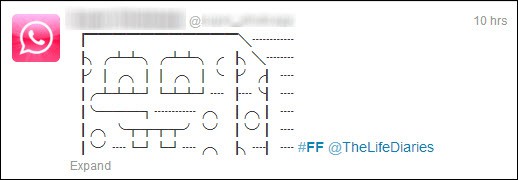
2.    Use the “#FF” hashtag to give a shout-out to your favorite Twitter connections.  This famous hashtag started in 2009, and went viral almost from the word “go”.

Originally “#FollowFriday”, it became so well-known, it was shortened to “#FF”.

Here’s how it works:

  • Every Friday, be sure to have a short list of worthwhile tweeters prepared.  Make sure they are relevant to your own followers.
  • Begin your tweet with the hashtag “#FF”, then add the Twitter handle of the person or persons you want to promote

When you #FF someone, you are telling people that this person is a great person to follow.  Many people just #FF an entire list of Twitter handles, one time only, remembering each tweet can only be 140 characters long.

1-multiple-ff

Others prefer to personalize each “#FF” recommendation with a small blurb about why their recommended Twitter user is worth following.  They may release individual #FF tweets all Friday long.  Here’s a powerful example of a single tweet:

2-india-ff

In the multiple tweet example preceding this one, the poster has done something a little different and recommended only verified tweeters – “verified” meaning Twitter has personally checked out the account holder and verified that they are for real.  (You usually see verification more with celebrities, to .)

In the single tweet, the poster does a masterly job of telling the Twitterverse what #FilmFare is and why people who love Bollywood movies should follow this hashtag – in five succinct words.

A little originality in tweets can cause a flurry of click throughs.  People are used to long lists of names to follow: They are not used to something like the #FF tweet below!

3-spongebob-ff

3.    Track your #FF tweets with TopFollowFriday. This free site by Humanxtensions allows you to see who is recommending who using the #FollowFriday hash tag – and if you’ve used it, you’ll see your individual results.  (Tip:  Use the full “#FollowFriday” hashtag: not “#FF”.)

4.    Throw a Twitter Party.  This has become an accepted part of Twitter culture, and is welcomed with enthusiasm.  If you have created an event, create a unique hashtag for it and tell your participants to start using it.

Be sure to prepare in advance:

  • A strong, relevant hashtag
  • A date and time
  • Invitations

Be sure to follow through, however:  Nothing makes you look more irresponsible than forgetting to keep the flow of promotion going for your Twitter Party – or, worse, forgetting to tell them it’s cancelled or the date and time has been changed.

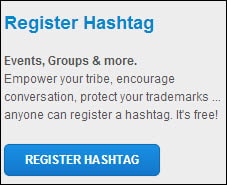
5.    Register your Twitter Party Hashtag at Hashtags.org. This will boost its effectiveness.

4-register-hashtag

6.    Make your tweet visual, if your business is visual.  Photographers, illustrators, web designers, picture book creators – this means you!

Of course, you can’t do this all the time – but do look for opportunities to do so.

7.    Know your specific goal for engaging on Twitter.  Then stick to it with your tweet topics and focus.  If you’re there for the branding, focus all your tweets (and your own Follows) towards that end.

And while you’re at it, actively grow your Twitter community.  Once you’re well-branded, you want to keep the ball rolling and your tweets going viral.

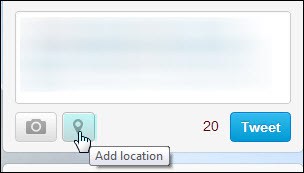
8.    Use Twitter’s geo-targeting abilities. When composing a tweet, you can instantly add your location, if it is relevant to your tweet topic, followers or business.

5-add-location

If you want to tract tweets about a specific geographical location, check out Monitter.com.

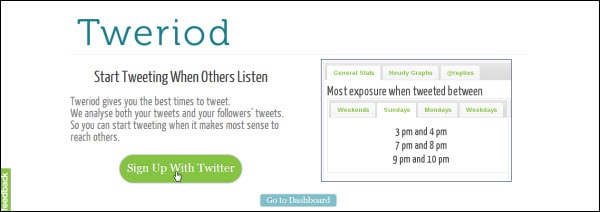
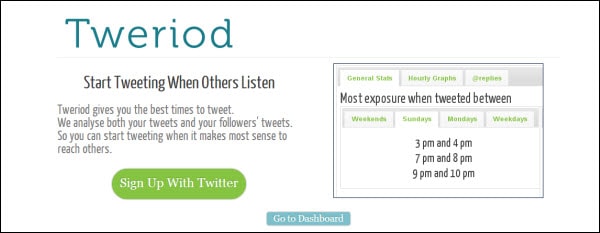
9.    Use tweriod to find your Twitter community’s preferred tweeting and retweeting times.  (All you need to do is sign up with Twitter, and tweriod will analyze your tweets and those of your followers, and present you with the results.)

6-tweriod

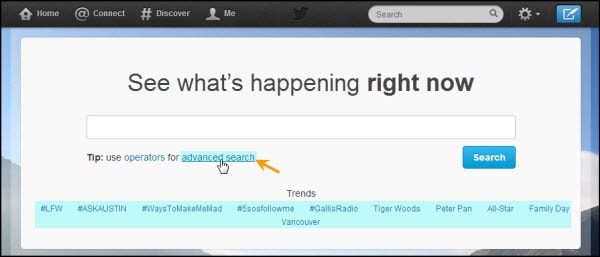
10.  If you can’t find the right topics or hashtags, use Twitter Search, a dedicated interface that also happens to show the latest trending hashtags.  But it’s biggest advantage?  It allows you to filter your searches with advanced settings advanced settings.

11.  Put your most important words or facts first.  People’s attention spans have grown so fleeting in this decade that they will even look away after the first five or six words, if you haven’t grabbed them with your tweet.

12.  Thank people who tweet about you or retweet your tweets – especially for Follow Friday (it’s part of the culture).

People like to be acknowledged and noticed, and thanking them by Twitter handle for a retweet or recommendation is the perfect way to do it.

13.  Make a habit of joining as many relevant Tweet Chats as you can.  If you pick one your business really fits, you can make great new contacts through the sense of instant closed community.

14.  Tweet current events that are in the process of happening – but do your best to keep these relevant to your followers and your niche.

Occasionally something is so shocking or momentous one has to comment – and that’s allowed.  But don’t tweet the latest celebrity scandal unless it has some point of connection or relevance to your niche community.  (E.G. Tweeting to your strictly-vegan followers:  “Vegan Brad Pitt caught chowing down on 10 lb. Texas Steak”)

7-advanced-search

15.  Be culturally aware, when using jargon or colloquial speech.  You may not be saying what you think you’re saying, if your followers are from other cultures or countries.

16.  Remove weak words from your tweet for maximum impact.  Words that weaken the power of a statement are “filler” words and phrases (E. G.  “So to speak”; “in my humble opinion”; “basically”.

Creating focused, powerful tweets increases your chances of getting them retweeted.

(Tip:  Adjectives and adverbs usually weaken – not enhance.)

17.  Pre-schedule tweets wisely – Remember that you won’t be there to respond.  It’s always best to wait around for at least ten to twenty minutes for interaction before logging out.

If you do have to pre-schedule, do it with social media managers such as HootSuite or  TweetDeck; or with other social networks with a pre-scheduling function, such as StumbleUpon, if you want to share web links at a time other than the present.

18.  Focus on your followers.  Tweet material you think they will find interesting – and that’s a good policy whether or not your tweets are personal or niche-oriented. Including the odd personal tweet is good, because it makes you interesting and human… as long as it’s something your audience can relate to or feel connection over.

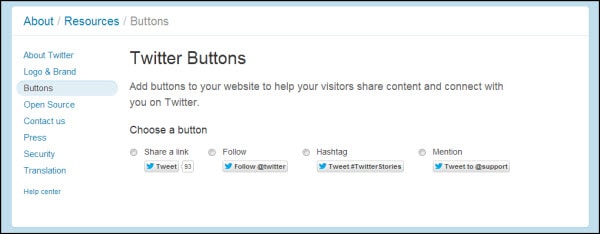
19.   Ask people to follow you on Twitter – Install targeted Twitter buttons in blog posts, guest posts, other social media sites and profiles; and on your website.

8-install-buttons

20.  Don’t just install the buttons – ask for the follow at the end of your posts or “About” blurbs!  (E.g.  “And be sure to follow me on Twitter, for more tips like these”.)

Growing your Twitter traffic is all about posting material your target audience will engage with.  These tips will help you ensure your targeted tweets are read, appreciated – and shared.


Category: Hidden, Social Marketing, Traffic Generation

Getting the Most From Retweets

By David Perdew Leave a Comment

How Retweets Work and Using Them to Grow Your Traffic

Retweets are probably the most over-used and least understood feature of Twitter.  Yet using them correctly can help grow your traffic like no other strategy.

“Retweeting” simply means sharing someone else’s tweet with your followers.  It’s a mark of endorsement and recommendation, telling them “this person has something of value to share”.

Getting your link or post retweeted by industry influencers can boost your reputation and status almost instantly.  And if many of your followers retweet your link to their followers… who in turn retweet it to their followers… it can mean instant Twitter success.

(The key, of course, is producing posts that powerful.

How to Retweet

There are two ways to retweet a tweet:

1.    Simply hit the little “Retweet” button that appears at the bottom of every tweet when you mouse over that area.  This makes Twitter retweet it as is, automatically.

1-retweet

2.    Manually retweet it.

To do this, open up a new tweet textarea box (in the top-left widget on your feed page).

Type “RT” plus the person’s handle.

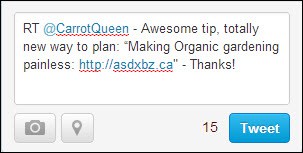
Copy-paste the tweet text.  Paste it after the “RT @handlename”.  Like this…

2-copy-paste

This will immediately show you the number of characters left for you to add a comment of your own.  And here’s where so many people lose their traffic-growing and engagement opportunity:  They write tweets that are simply too long to manually customize and retweet.

There is no room left for customization or endorsement.

Think about it:  What will ultimately bring you more traffic?

  • Posting a tweet that uses up all available characters, so people have no choice but to impersonally press the automatic “Retweet” link
  • Leave room for people to make positive, personal comments that act as both validation and a highly-personal testimonial

Let’s take another look at our Retweet of @CarrotQueen’s original post, which is highlighted in aqua…

3-leaving-room

Notice how much room she left.  Enough for us to type “RT @CarrotQueen”, then add a personal reason stating why we loved her post enough to retweet it.

That is the sort of retweet that:

  • Makes people also interested in the topic being retweeted sit up and take notice
  • Go check it out
  • Follow @CarrotQueen

Be sure to mix retweets in with other post types.  Whatever you do on Twitter, it should feel like a natural action, a normal conversation.  If you retweet sparingly, resisting the urge to reciprocate straight away for everyone who retweets your posts, people will sit up and take notice, when you do find a diamond you want to share.

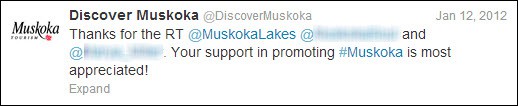
So you don’t have to start reciprocal retweeting – but it is good policy to acknowledge and thank anyone who retweets your post – as quickly ask possible.

4-thanks

 “How Do I Find Out Who Has Retweeted My Posts?”

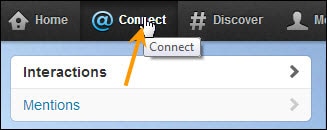
That’s simple.  Just go up to your top menu bar and click on “Connect”.

5-connect

You will immediately be able to see:

  • People who have mentioned you in their tweets
  • People who have retweeted your tweets

To find all activity involving retweets, select “Interactions”.  You’ll see a list – and you’ll instantly be able to acknowledge anyone you missed.

“How Do I Turn Off Serial Retweeters?”

In your zeal to take advantage of retweet power, there is one type of tweeter you never want to become – the Serial Retweeter.

This type of tweeter is often just sheer lazy:  He sends automatic retweet after automatic retweet because he can’t be bothered to write an original post – let alone a personalized recommendation.

He’s letting other people do his work for him.

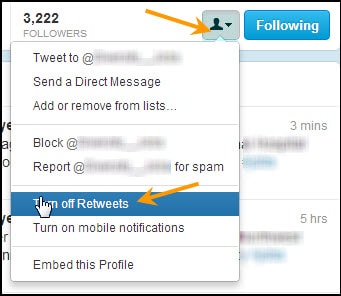
You will probably come across Serial Retweeters before too long.  They clutter up your feed and are a nuisance.  Here’s how to get rid of them without necessarily unfollowing them…

1.    Click on the Serial Retweeter’s Profile Photo.  This will open up his or her Profile.

2.    Click on the icon to the left of “Following”.  Select “Turn off Retweets”.

 6-turn-off-retweets

There is one good reason not to rush into getting rid of people who retweet a little too often:  Studying their example can be a powerful teacher of what not to do!

Ten Tips for Powerful Retweeting

Retweets can give you no results, “okay” results or noticeably effective results.  To increase your chances of attaining the latter, follow these ten well-proven tips…

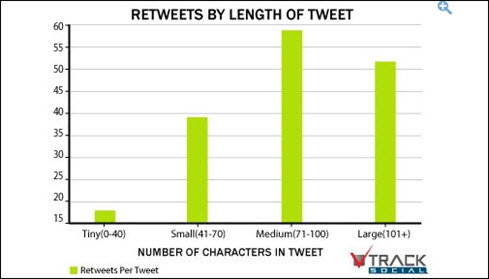
1.    Keep your character count between 70-100 characters, if you want your tweet retweeted.  As proof of what we were saying earlier, check out the graph screenshot, below.

Business Insider published the results of an analysis performed by Track Social, which showed the optimal number of characters that got retweeted.

7-graph-track-social

2.    Retweet relevant tweets.  That might seem pretty obvious, but it’s important enough to stress.

3.    Be choosy in what you share.

4.    Don’t just retweet tweets: Take the time to visit your prized Twitter connection’s blog or website and share content directly, if you think it’s truly going to interest, amaze, help or entertain your other connections.

5.    Don’t be monotonous when retweeting.  Don’t always retweet links.  Don’t always retweet quotes.  Don’t always retweet tweets by others.  Mix your tweet types – and intersperse tweets with retweeting.

People who always send the same type of tweets quickly get “tuned out”

6.    Study other people’s retweets.  Study retweets of people who have retweeted your posts.  Which ones leave you cold?  Which are confusing?  Which are effective?  Which retweets pleased you most?

Being observant is one of the greatest teachers you could have.

7.    Remember that tweets containing links are shared more often than those without.  Understanding this cultural practice should help you increase your retweetability.

8.    Retweet when your target market is most active on Twitter.  One of this social network’s biggest drawbacks has always been how fleetingly tweets appear and are lost in the never-ending stream.

Metrics site Tweriod recommends doing so between 2—6p.m., if you’re not sure when your target audience is there (or there is too much traffic at other periods that might work better).

8-Tweriod

9.    Use URL shorteners to give your followers more characters to customize, when they retweet your content.  (Bit.ly and Ow.ly generate the most Retweets, compared to other URL shorteners such as tinyurl.com.)

10.  Use the Magic Word.  Studies have confirmed that tweets containing the word “please” are retweeted more often.

11.  Talk directly to your audience, when tweeting. Studies have also shown that people are more likely to retweet when you begin a post with “you”.

12.  Ask for a retweet!  Using the phrase “please retweet” can be as good as a secret weapon.

If you want retweets to help you grow your traffic, either have hordes of followers… or create tweets that are irresistible to your intended audience.  Really work on making your tweets lean, mean, exciting and above all, shareable – and you’ll get those new followers quickly enough!


Category: Hidden, Social Marketing, Traffic Generation

How Hashtags Work

By David Perdew Leave a Comment

How Hashtags Work and Using Them to Grow Your Traffic

Most people discover hashtags quite early in their Twitter journey.  And many more ignore them till much, much later, when their Twitter habits are set and established.  If you are new to this unique social network, you need to know that you can instantly attract the right followers, find the right people to follower and hook into the best network segment for your goals straight away… simply by using and following hashtags.

This is what an effective hashtag (Penguin’s “#DailyDeal”) looks like, in action:

1-penguin-tweet-with-hashtag

It doesn’t have to be used for just promotion or branding.  A hashtag can be a keyword, hook, topic indicator, community connection tool and search filter all in one go.  It strains out the hordes of spammy tweets that seem to populate the Twitterverse at times, and instead brings up ones relevant to your interests – specifically, to the keyword (hashtag) that you chose as your filter.  It also makes your tweets easier to find for your audience, when you share your hashtag.  (Get it right, and it may even go viral!)

What is a Hashtag?

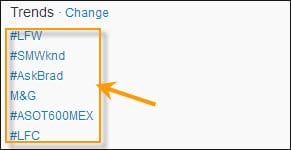
Hashtags look like this… A word, acronym or collection of characters preceded by (#).

2-trends-with-hashtags

The above screenshot shows one quick way, incidentally, to find out which hashtags are trending right at the moment, while you’re logged in:  By glancing over to your left-hand menu bar and checking the top hashtags that are trending, under the “Trends” window.

You can create your own hashtags.

You can follow other peoples’.

You can follow company or resource hashtags too (e.g. “#Nike”, “#freefood”).

Google+, Pinterest, Pheed, YouTube and Instagram also allow hashtags.  Pinterest and Pheed hashtags in particular, however, are not the same as Twitter hashtags, so make sure you study each network’s specific hashtag guidelines.

8 Benefits of Using Hashtags

You can use hashtags for a variety of functions – and reasons.  We’ve already mentioned narrowing the focus on who to follow, and you can create your own hashtags to serve more than one purpose too.  But before you start using them, you have to be aware of their specific benefits.  Knowing these will affect how you choose to use hashtags.

  • Grow your following and extend your reach
  • Find relevant people, companies and organizations to follow
  • Brand a product or business (e.g. “#Nike”)
  • Brand, promote, manage and track an event through its distinctive hashtag
  • Participate in Tweet Chats and Twitter Parties
  • Quickly tweet information to people (Twitter followers, forum members, subscribers, etc.) who follow your custom hashtag
  • Networking with industry or niche influencers and peers
  • Grow traffic

Creating Your Own Hashtags: 101

Creating your own hashtags is a wonderful way to brand a product, business – or a particular promotion.  (You can use your hashtag as a metrics tool, if you create one for a campaign.)

But it’s like anything else in marketing:  You need to know what not to do, and how to get the maximum effect.

Don’t…

  • Use hashtags containing more than two words (e.g. “#marketingmythsfifteentips”)
  • Create hashtags that are too quirky – unless you have a whole army of promotion tactics to spread it.  (Example:  You want to create a unique identity for an event)
  • Start your tweet with numbers (e.g. “#999”).  You can include numbers – but only after alpha characters (e.g. “#fuzzimals123”)
  • Overuse hashtags.  Keep them for important and highly relevant use.

Do…

  • Make your hashtag short
  • Make your hashtag easy to read (e.g. “freepizza”)
  • Make your hashtag as vividly descriptive – and simple – as possible (e.g. “freepizza”)
  • Remember to use your hashtags to designate topics, subjects or categories

So how do you make a hashtag?  Simply preface any word or word combination with the “#” sign (#MyHashtag) – and share it in a tweet.

You can make your hashtags all lower-case, or use initial caps as above, to help people make visual sense of your combination hashtag.  (“#MyHashtag” is easier to read than “#myhashtag”.)

That’s the easy part.

Making your hashtags go viral is the real trick.

Making Your Hashtags Go Viral

The only way to grow traffic with your hashtags is to make sure they are shared – and more than shared.  You want them to explode on the scene like a spectacular firework and go viral.

We’ve already spoken about the importance of creating hashtags that are short, catchy, easy to read and relevant.  The real trick is to pick the right keyword(s); then pair your new hashtag with a relevant, active hashtag.  For example, if you have created “#FBbloopers”, pairing it with the existing, highly-active hashtag “#socialmedia”.

And, of course, the bigger your list, the more likely your hashtag is to be retweeted and followed.  If you don’t yet have a big list, introducing it on membership sites or forums (if allowed), as well as the above tactic of pairing it with an existing, relevant hashtag should help you get started.

Finding Good Hashtags to Follow

Following the right people via their hashtag can also help boost your own credibility (think  “credibility-by-assocation”), which can net you followers of your own.  You become part of any community built around a strong, evergreen hashtag.  But how do you find them?

In addition to simply searching via the Twitter search bar, there are even more focused ways to find hashtags to follow – especially off Twitter.

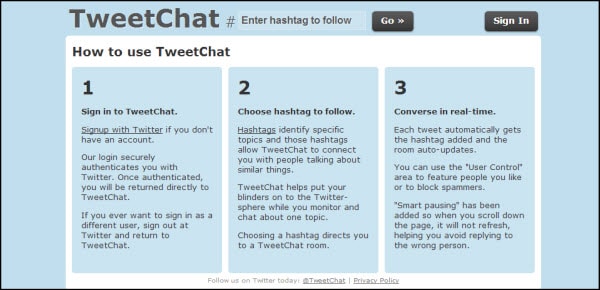
1.    TweetChat – You do have to log in with your Twitter name and password.  What this does is allow to focus on one hashtag, each having its own dedicated chat room.

3-tweetchat

This can save you hours of monitoring tweets you’re not interested in on Twitter by allowing you to focus just on that particular discussion/hashtag.

2.    Twubs – Another strong hashtag directory, which also shows you hashtags and conversations to follow, and allows you to register your hashtags in their directory

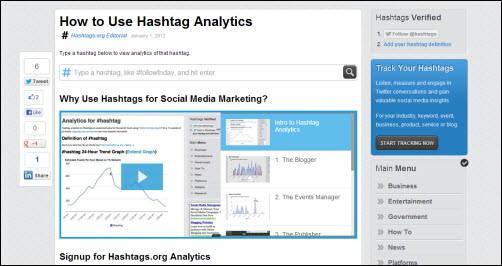
3.    Hashtags.org – allows you to analyze which hashtags are trending, allowing you to “listen, measure and engage”… as well as track!

5-hashtags-dot-org-analytics

There are many more Twitter sites and online management tools.  Pick one that feels a comfortable fits for you.

Hashtag Mistakes

Yes, you can dilute the effectiveness of hashtags – or even do the opposite of what you intended.  For example, if you load each tweet with too many hashtags, people will eventually mentally and literally skim over them without reading.  They’ll feel like “spam”.

So here’s what not to do with your Twitter hashtags, starting with the tip we just mentioned:

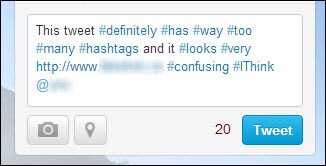
  • Overloading your tweets with multiple hashtags.  It looks and feels aggressively spammy; it’s confusing; it’s hard to read the message you presumably wanted people to read.

4-too-many-hashtags

  • Following hashtags that are not consistent with your brand or stated core values.  Doing so is okay if you are using Twitter as personal recreation – but not if you’re using it for business purposes.

(Example:  Following “#ReallyHateSmallKids” if your business is all about selling quality toys suited for the 3—7-year-old age range to university-educated mothers in a high income bracket.)

  • Inserting popular, trending hashtags not relevant to your tweet content just to ensure your tweet is seen.  The only thing does is annoy the people who are seriously follow that hashtag.
  • Going off topic while using a hashtag.  Don’t get sidetracked into personal discussions that have nothing to do with the hashtag while still using it!
  • Not tracking your hashtags.  Sites such has Hashtags.org often provide easy and thorough tracking tools (free or at paid levels of subscription)
  • Trying to use other special characters in your hashtags.  It’s alphabetical characters only – with numerals allowed in the middle or end.

Don’t overcomplicate things. Focus your hashtag on your goal and your followers.  Make it easy to read and catchy to remember and share.

Now that you know how hashtags work, and what to do/avoid, put them to use.  Make your traffic grow.

Category: Hidden, Social Marketing, Traffic Generation

  • Previous
  • 1
  • 2
  • 3
  • 4
  • 5
  • Next
dd-sidebar-ddvertical-1

Sign In >

Popular Posts

NAMS Funnel Revealed
Discover the 3 Sales Funnel Stages that Everyone Must Use to Become Profitable Fast!
Your YouTube Marketing Strategy with 5 Easy Tips
How to Increase Traffic Through Social Media
Use Pinterest as a Marketing Tool: 9 Ways to get More Traffic and Sales

About NAMS

The Novice to Advanced Marketing System is a step-by-step system focusing on Team, Training and Tools to help novice to advanced business people build a Simple, Scalable and Sustainable business.

Other Related Content

5 Affiliate Marketing Strategies that Convert Like Crazy

5 Myths of Affiliate Marketing | Affiliate Marketing For Beginners

5 of the Best Affiliate Marketing Tips

5 Passive Income Business Ideas

Affiliate Marketing Roundup – 02/13/2011

  • Help Desk
  • Contact
  • Support
  • Privacy Policy
  • Earnings Disclaimer
  • Legal Notices
  • Membership Agreement
  • TOS
  • Testimonials
  • Affiliate Disclosure

Copyright © 2025 · MyNAMS.com · All rights reserved
NAMS, Inc. 203 CR 890, Etowah, TN 37331 USA

Disclosure: Some links on this website may be affiliate links. If you make a purchase through one of our affiliate links, we may earn a commission.
We only endorse products and services we use or trust.